Choosing the best sovereign AI server starts with the work it needs to do. Running a model for one user does not establish how the server performs with long documents and requests arriving together. Before you commit to a build, you need to know how it performs under the demand your business expects.
For a sovereign deployment, you also need to know where data goes and who can reach it. The answers depend on how the model software handles requests and what access your staff can receive. Those arrangements need to be clear, because they shape how much control your team retains once the service is running.
This guide compares six servers against a consistent set of buying criteria. We start with the graphics processing units (GPUs) each server supports, because these chips accelerate much AI computation. Then, you have a shortlist to test against your workload.
How we compare servers for sovereign AI
These servers are candidates for review against these six criteria:
- Workload fit: which features suit the AI service you intend to run.
- GPU options: supported cards and limits on how they fit in the server.
- Rack and cooling: the space, power and site conditions the build requires.
- Deployment control: hardware trust features and the wider access rules still to assess.
- Management and support: software for managing the server and who maintains or repairs it.
- Complete cost: the hardware, setup and running costs included in the offer.
Of course, your workload and site are important factors that narrow your shortlist. Access controls and the capacity to maintain the service also help determine which candidates remain.
Sovereign AI server comparison: six options for your workload
Here are the six systems and their main hardware differences.
| Server | Workload fit | GPU options | Rack and cooling |
| Dell PowerEdge XE7745 | Inference or fine-tuning configuration | Up to 8 double-width or 16 single-width | 4U, air-cooled |
| GIGABYTE G493-ZB0-AAP1 Rev. 3.x | Standardized multi-GPU build | Up to 8 dual-slot; uniform GPU model | 4U, fan-cooled |
| HPE ProLiant Compute DL380a Gen12 | Project with a specific GPU choice | Up to 8 RTX PRO 6000 Blackwell Server Edition | 4U; cooling depends on configuration |
| Lenovo ThinkSystem SR675 V3 | Choice of PCIe chassis layouts | Separate 4- and 8-double-width layouts | 3U; configuration-specific cooling |
| Supermicro SYS-522GA-NRT | Configurable PCIe GPU deployment | Detailed specifications: 8 double-width; headline conflicts | 5U; GPU-specific operating limits |
| Xi NetRAIDer 64XE | Custom rackmount configuration | Advertised 4- or 8-GPU 4U options | Multiple chassis; exact build matters |
1. Dell PowerEdge XE7745: Air-cooled PCIe GPU options
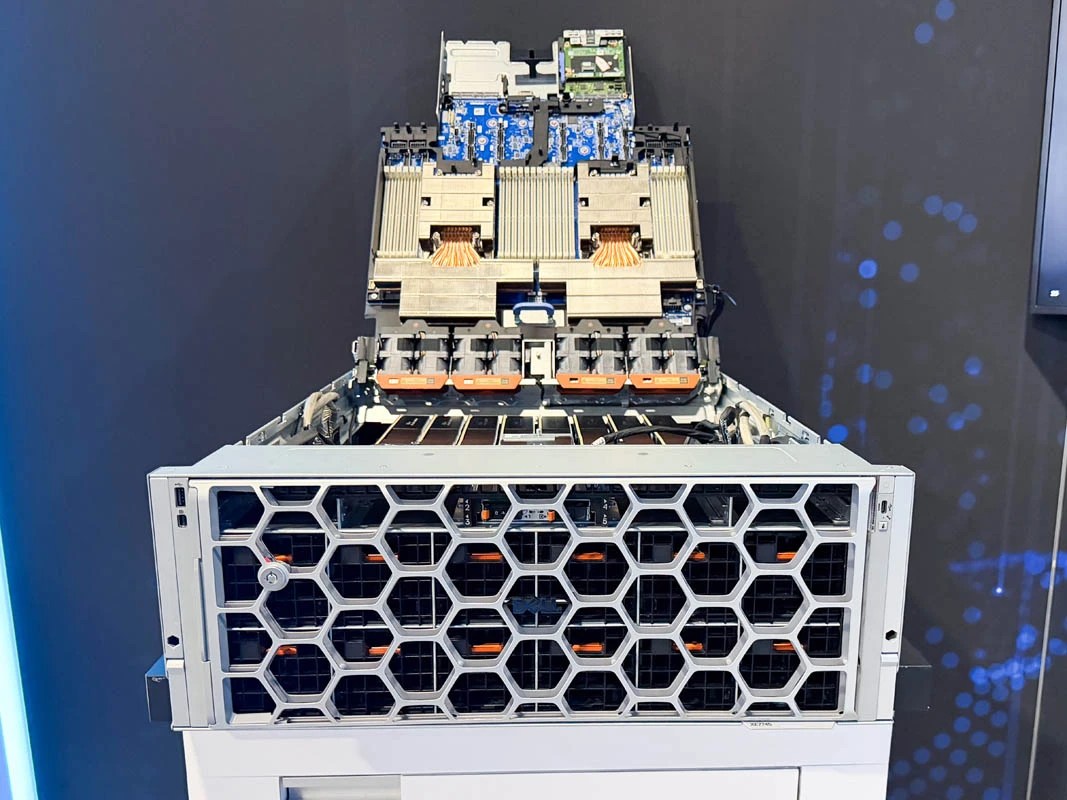
Dell PowerEdge XE7745 supports air-cooled PCIe GPU builds for inference and fine-tuning. It fits projects that call for a rack server with room for multiple cards and built-in hardware management.
The double-width and single-width options give you different ways to fill the server. Once you have selected the cards, testing that exact build shows how it handles long prompts and requests arriving together.
Firmware security and iDRAC access
Dell lists signed firmware and protections for the server’s startup process. Firmware is the software that starts and controls the hardware before your AI service runs.
Dell names Integrated Dell Remote Access Controller (iDRAC) as its management interface. If your infrastructure team manages the server remotely, iDRAC access belongs in its operating plan. The included functions and licenses determine which hardware-management tasks the team performs through that interface.
The people running the AI application handle model updates and data permissions. Separating those duties from hardware administration helps define who responds when a problem affects the server or the application.
2. GIGABYTE G493-ZB0-AAP1 Rev. 3.x: Uniform GPU configurations

GIGABYTE validates the G493-ZB0-AAP1 Rev. 3.x with a uniform GPU model. That condition suits a team building around one card type. Plans to mix different cards fall outside that validation.
Optional TPM and remote management
GIGABYTE lists an optional Trusted Platform Module (TPM), which protects cryptographic keys used to secure data or prove identity. The AI software has its own accounts and access controls, which fall outside the TPM’s key-protection role.
Its management console lets your team monitor hardware and manage the server remotely. Remote administration falls within the same control review as the AI software. Restricting that access means deciding who uses the console and which networks reach it.
G493 warranty and onsite support costs
The hardware price comes from a configured quote. Onsite support requires a separate written contract, so the support offer matters alongside the hardware.
GIGABYTE has a US enterprise contact. Warranty claims normally go through the seller, while direct purchasers use GIGABYTE. Its hardware warranty does not cover the complete AI software service.
Keeping a supported replacement available matters when the service depends on one GPU model. For a team managing the AI software in-house, the onsite contract defines hardware repair coverage, while application support remains an internal responsibility.
3. HPE ProLiant Compute DL380a Gen12: GPU-specific configurations

HPE lists several GPU builds for the ProLiant Compute DL380a Gen12. Card limits and cooling needs vary by GPU, so your choice of card determines which build to assess.
An eight-card RTX PRO 6000 Blackwell Server Edition build requires specific front fan and panel kits. Card counts published for another GPU do not establish support for this build.
Firmware protection and iLO management
HPE lists hardware-rooted firmware protection for the server. The AI software still has its own accounts and support arrangements, so hardware protection covers only part of the deployment.
HPE lists Integrated Lights-Out (iLO) for remote server access and Compute Ops Management for server management. An operations team already using iLO has a familiar interface for this build. On a restricted network, functions that depend on outside services must fit the connections the team permits.
Cooling requirements and management licenses
The cooling kits belong in the build from the start, because the selected GPUs determine how the server must be cooled. Management licenses cover the functions your team selects for running the hardware.
4. Lenovo ThinkSystem SR675 V3: Four- and eight-GPU PCIe layouts
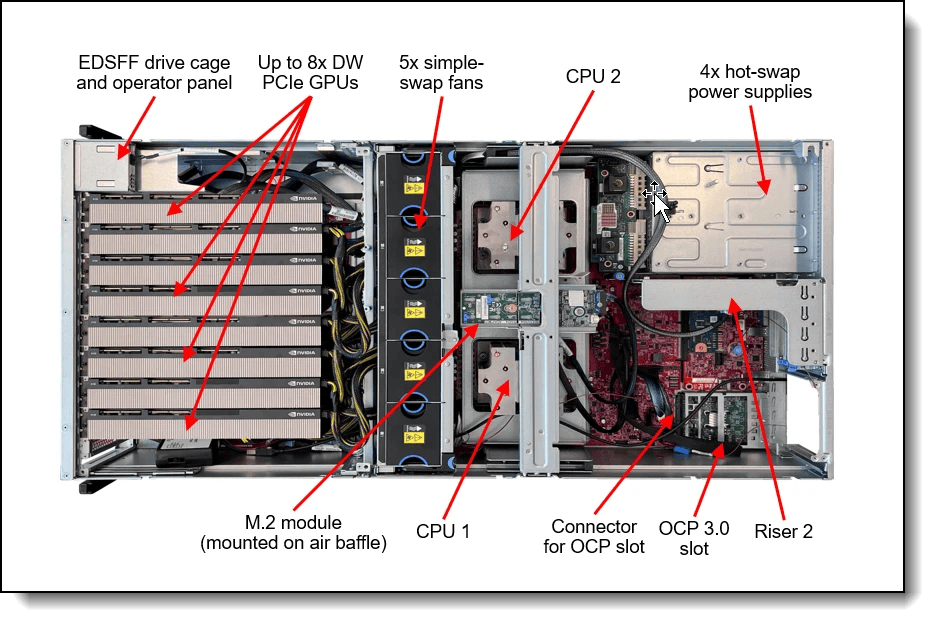
Lenovo offers separate PCIe chassis layouts for the ThinkSystem SR675 V3. Choosing the layout first gives your supplier a specific set of card slots and storage options to quote and test.
The family also offers an HGX platform, a different GPU assembly from the PCIe versions covered here. Its features do not automatically apply to those builds. Keeping them separate avoids assigning a GPU connection or expansion feature to the wrong model.
Lenovo’s 3U rack format suits installations where available rack space limits chassis choice. The selected build still sets the site’s power and cooling requirements, so rack size alone does not establish whether the site supports it.
TPM features and XClarity management
Lenovo lists TPM and chassis intrusion features for the server. These hardware features sit alongside the software access controls used in the AI deployment. At the same time, Lenovo’s XClarity software manages the hardware.
Warranty coverage and repair response
Warranty coverage and repair response times must match the exact model and delivery site. For an internally operated service, those terms define the hardware support available to the team keeping the AI application running.
5. Supermicro SYS-522GA-NRT: GPU capacity and cooling limits
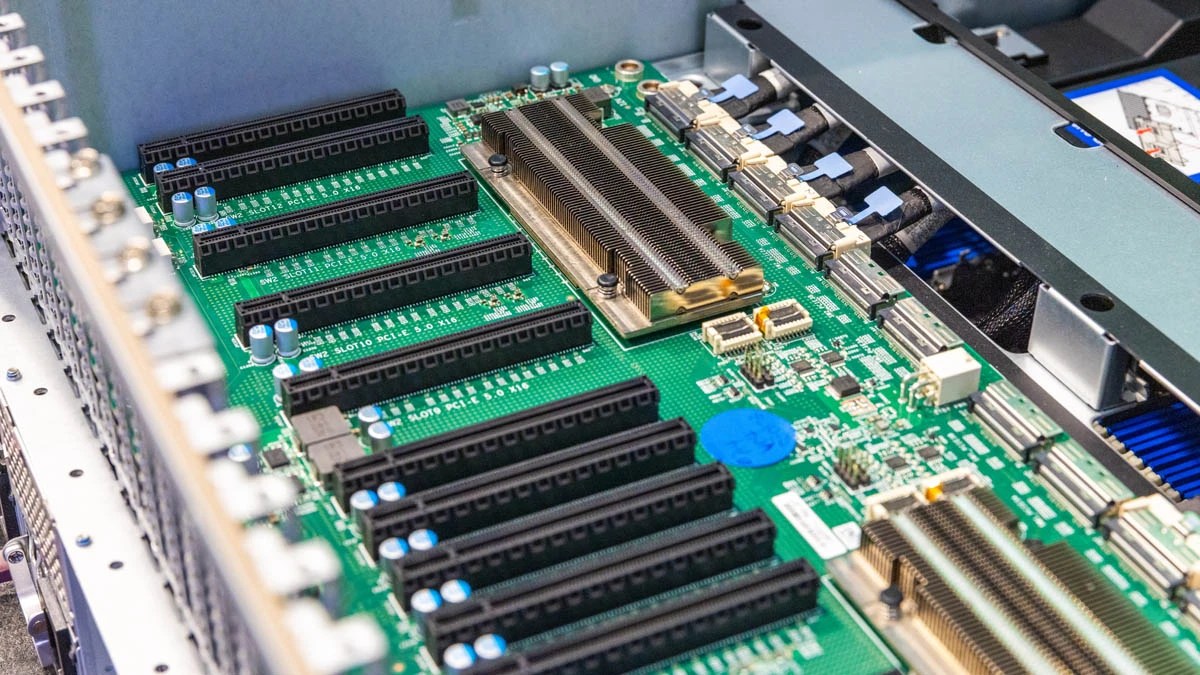
Supermicro’s SYS-522GA-NRT lists eight double-width GPUs in its detailed specs. Its headline gives a different count, leaving support for a larger build unresolved.
Each GPU build also has its own cooling limits. Supermicro’s model manual gives an operating range of 10°C to 30°C with eight RTX PRO 6000 GPUs. For this configuration, the model-specific limit determines whether the site provides suitable cooling.
This makes the SYS-522GA-NRT a candidate for teams that design GPU capacity and facility cooling together. The temperature limit becomes a requirement for the operating site from the start, rather than a detail left until installation.
Firmware protection and service coverage
Supermicro lists firmware and startup protections, along with server management software. Where your team runs the AI service itself, a hardware support agreement sets the provider’s repair responsibilities. Your own support plan covers the model and application, so a hardware repair is only one part of restoring the service.
6. Xi NetRAIDer 64XE: Custom rackmount GPU configurations
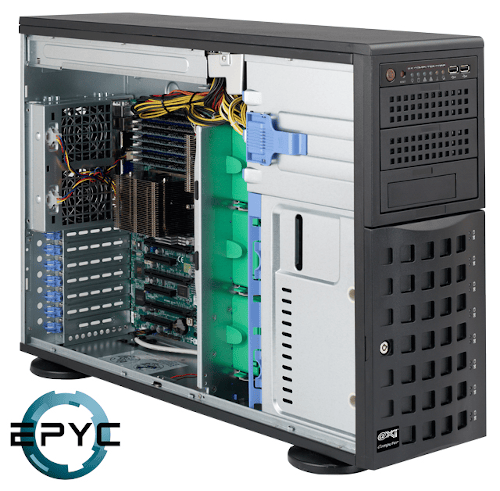
Xi describes the NetRAIDer 64XE as a rackmount family with several chassis choices. It is a candidate for a custom build if the final offer names supported cards and a compatible chassis.
The processors, GPUs, and chassis must be supported together, with power and cooling specified for the build.
NetRAIDer management and onsite support
Xi’s custom-build model puts management access alongside the hardware choices. The management interface is part of the chosen configuration, so it should not be inferred from the NetRAIDer family name alone.
Xi describes a California-based build and support team. Its public warranty terms treat on-site service as a separate purchase from hardware coverage.
For a team running its own AI application, the onsite agreement defines the hardware provider’s repair responsibilities. The team’s application support plan then covers model maintenance and restoring the AI service after a disruption.
How to size an AI server for inference and training
Sizing an on-premises AI server starts with model memory, then tests how the service handles real demand. Loading the model shows that it fits in the memory available at that point. A workload test establishes whether the service meets response-time and answer-quality targets during busy periods.
AI inference, fine-tuning, and training require different resources
Training from scratch starts with a new set of model values, rather than adapting an existing model through fine-tuning. Hardware demand varies with the model and the training method.
For a business app using an existing model, inference is the relevant starting point. A training-focused build makes sense only when the project includes that workload. Serving software runs the model and handles requests. Its version belongs in the technical brief alongside the model version, so the supplier knows what the hardware will run.
Precision is the number format used to store model values, and it affects memory use. A test of a lower-precision build shows how much memory it uses and how fast it runs. The answers must also meet your quality standard.
Context length and concurrency affect GPU memory demand
Active requests use memory beyond the model itself. Video random-access memory, or VRAM, is the GPU’s memory for model data and information used while it runs. The key/value cache retains data the model uses to attend to text in a request. Longer contexts and more requests at once therefore affect memory demand.
Employee count is a weak substitute for request demand. The workload describes how many requests arrive together and how much text each includes. Long-document analysis requires its own test of memory use and response times.
A single GPU remains an option if it supports the model and required service level. Multiple GPUs add choices about how to divide computation and how the cards exchange data. The workload or recovery plan provides the reason to add cards, rather than slot count alone.
Validate AI server performance under normal and peak demand
A fair benchmark uses the same model and request conditions for every build you compare. Your test brief gives suppliers the inputs against which to report results:
- Model and serving-software versions, with the selected precision.
- Typical and demanding input/output lengths.
- Simultaneous demand and the response-quality standard.
- Time to first token, meaning the delay before the answer starts, and acceptable completion times.
A sustained run at peak demand tests for queues and rejected requests that a brief test could miss. A separate recovery test assesses how the service handles the maintenance or hardware failure you test.
The site must support the tested build. A power supply rating states its capacity, not how much power the workload draws. The circuits and cooling must support the selected parts and their published operating limits.
3 tips to make an AI server suitable for sovereign deployment
A server is suitable for sovereign deployment when the full environment meets your stated control rules. A review of sovereign AI infrastructure covers the services that process data and the people who manage them. It must identify access beyond the physical server.
Assessing what sovereign AI means for your organization gives the purchase a set of control requirements. Your supplier’s reply connects each rule to the hardware or service that addresses it in the proposed build.
Map AI data flows and administrator access
The deployment map shows which services process or store records and who has access. Document search often uses an embedding model to turn text into lists of numbers. Those values help the search service find related content. The index that stores them falls within the same review as the model server.
Administrator access includes remote management and support, as well as the AI software. The access plan states who holds sign-in details and reads stored logs. The same plan assigns permissions for each access point and records who is responsible for them.
Air-gapped AI deployment requires local dependencies
An air-gapped environment has no link to outside networks. The server must store its model files and supporting software locally, including files used after a restart.
An offline test should cover sign-in, adding new documents and getting Model responses. A restart tests whether the service still runs with the files and connections available there. A connected setup remains an option if its documented controls meet your rules.
Define AI update, recovery, and exit responsibilities
Operating control includes who makes changes and who restores service. The support plan should name who handles updates and sensitive access, with deployment strategies that limit service interruptions. A recovery process sets out how to bring the app back after a failure.
Exit terms matter because models and business needs change. Exporting data and settings reduces what the team must rebuild when moving to another serving platform. These questions also help separate a private AI deployment from a hardware-only purchase.
Friendly reminders for calculating Private AI server costs
The cost of a private AI server includes setting up and running the service over its planned life. Hardware prices are comparable only when offers cover the same build and services.
Compare complete AI server configurations
Equivalent offers include the parts and services required for the same deployment. A base chassis price leaves the cost of GPU cards and other selected parts open. Software licenses and software systems integration add further costs. Integration connects the app to your records.
Setting up the server adds costs for any circuit or cooling changes. The estimate also covers support and server management over the planned service life. If application support sits outside the hardware contract, your team must budget for the people maintaining the application.
Account for idle and standby GPU capacity
Ownership costs continue when demand is low, or you keep GPUs in reserve for recovery. A forecast that separates productive use from spare capacity accounts for this cost instead of assuming that every card runs at full load.
Hosted services deserve the same workload assumptions. Their costs depend on the model and pricing plan, including eligible discounts for reused prompt content or scheduled processing. A lower rate matters only if the service also meets your response and control rules.
When choosing an AI server for business use, assess cost against the job of your staff. A finished document analysis and an answer that requires major correction have different value, even if both use GPU time.
Review AI server quote validity and delivery terms
Commercial terms state the price and delivery commitments in an offer, but do not always guarantee that the price will remain unchanged until delivery.. The Financial Times reported suppliers seeking price increases of up to 45% on certain AI-server deals after contracts had been signed.
Your budget therefore depends on the terms that apply from quotation through delivery. The quote’s expiry date sets how long the offer remains open, while price-adjustment terms address later component-cost changes. Delivery dates and permitted substitutions affect installation planning, especially if a replacement GPU changes the build your team prepared to run.
How to choose the best sovereign AI server for your workload
By the time you choose a server, you should be able to answer three practical questions: does this exact build handle our workload, who controls the service, and what will it cost to run? A realistic workload test answers the performance question, while documented access, support and commercial terms establish how you will run and pay for the service.
If you’re planning an AI service on your own hardware, Eastgate Software’s private and sovereign AI services cover GPU sizing and deployment. We define the tests with your team and apply your source-access rules in the software.