Legacy software modernization without the big-bang risk
The problem is not careless teams. It is that the legacy system keeps changing while its replacement is being built. Before long, the two systems drift apart and the full risk lands on a single cutover day.
We have taken over programmes after a big-bang rewrite was attempted and abandoned. Starting from the running system may take longer to explain, but it gets working improvements into production sooner, and keeps every step reversible.
Trusted on systems that cannot fail












Why incremental migration reduces modernization risk
A rewrite and an incremental migration can end at the same modern system. They differ in where the risk sits, when value arrives and what happens when a release fails.
Big-bang rewrite
Incremental migration
-
Risk profile
Big-bang rewrite: One cutover carries the risk of the entire programme.
Incremental migration: Risk is spread across small, reversible releases.
-
First value
Big-bang rewrite: Value arrives at the end, if the final deadline holds.
Incremental migration: The first production slice typically arrives within 6-8 weeks.
-
Failure recovery
Big-bang rewrite: Roll back everything or release a broken system.
Incremental migration: Roll back one slice while the rest of the system stays live.
-
Legacy system
Big-bang rewrite: It keeps changing while the replacement falls behind.
Incremental migration: It is retired gradually as each component is replaced.
-
Undocumented behavior
Big-bang rewrite: Hidden rules are discovered in production by users.
Incremental migration: Existing behavior is captured in characterization tests before migration begins.
-
Funding
Big-bang rewrite: One large investment is made without interim proof.
Incremental migration: Each slice is funded and reviewed against delivered value.
Six steps from legacy software to a modern platform
One team, accountable for the whole lifecycle, not a slice of it.
Select a step to play it on the map
- 01
System and risk assessment
We map the system, its dependencies and its operational risks before anything moves.
- 02
Characterization tests
Existing behavior is captured as tests. These tests protect the rules users depend on, including the ones nobody documented.
- 03
Incremental migration
The new system replaces the old one piece by piece. Stable interfaces keep both sides working together throughout the transition.
- 04
Data migration
Data moves in controlled batches, with reconciliation and integrity checks before each cutover.
- 05
Re-platforming
The application moves to a supported runtime, build process and deployment platform without rewriting working business logic unnecessarily.
- 06
Cutover and decommissioning
Each component moves through a controlled switchover. Once the replacement is proven, the corresponding part of the old system is retired cleanly.
A modern system, with proof nothing important was lost
Every migrated slice reaches production with evidence that the behavior your business relies on still works.
Assessment
- System map. Document the application, data flows and dependencies.
- Risk register. Identify migration risks and define practical mitigations.
- Behavior coverage. Capture current behavior through characterization tests.
- Delivery roadmap. Break the programme into fundable slices with named gates.
Migration
- Stable interfaces. Route traffic safely between the old and new systems.
- Incremental modules. Replace one bounded part of the system at a time.
- Verified data. Migrate data with reconciliation and integrity checks.
- Parallel comparison. Run old and new components together to confirm matching results.
Cutover
- Reversible releases. Give every cutover a tested rollback path.
- Planned retirement. Decommission the old system only after the replacement is proven.
- Operational handover. Provide documentation, runbooks and support procedures.
- Team enablement. Prepare your engineers to operate and extend the new platform.
Every slice must prove it is ready to go live
All three checks must pass. If one fails, the release waits while the existing system keeps running.
- Reversible change. One slice can be rolled back without affecting the rest of the system.
- Behavior preserved. Characterization tests prove that critical workflows still work.
- Maintainable stack. The new technology is supported, practical to operate and familiar enough to hire for.
Move from legacy platforms to supported, cloud-ready systems
COBOL may still run your core operations. Delphi may still power the desktop, and Oracle Forms the back office. We modernize these systems one component at a time, without discarding working business logic simply because the technology is old.
Migrating from
Mainframe, desktop and back-office applications that still run essential operations, often with tightly coupled components and business rules nobody documented.
Common legacy technologies include:

Migrating to
Supported technologies your team can operate and hire for. Each component moves to the platform that fits its role rather than forcing the entire system onto one stack.
- Application
-
-
- Data
-
-
- Platform and delivery
-
-





Traffic control software modernized without taking it offline
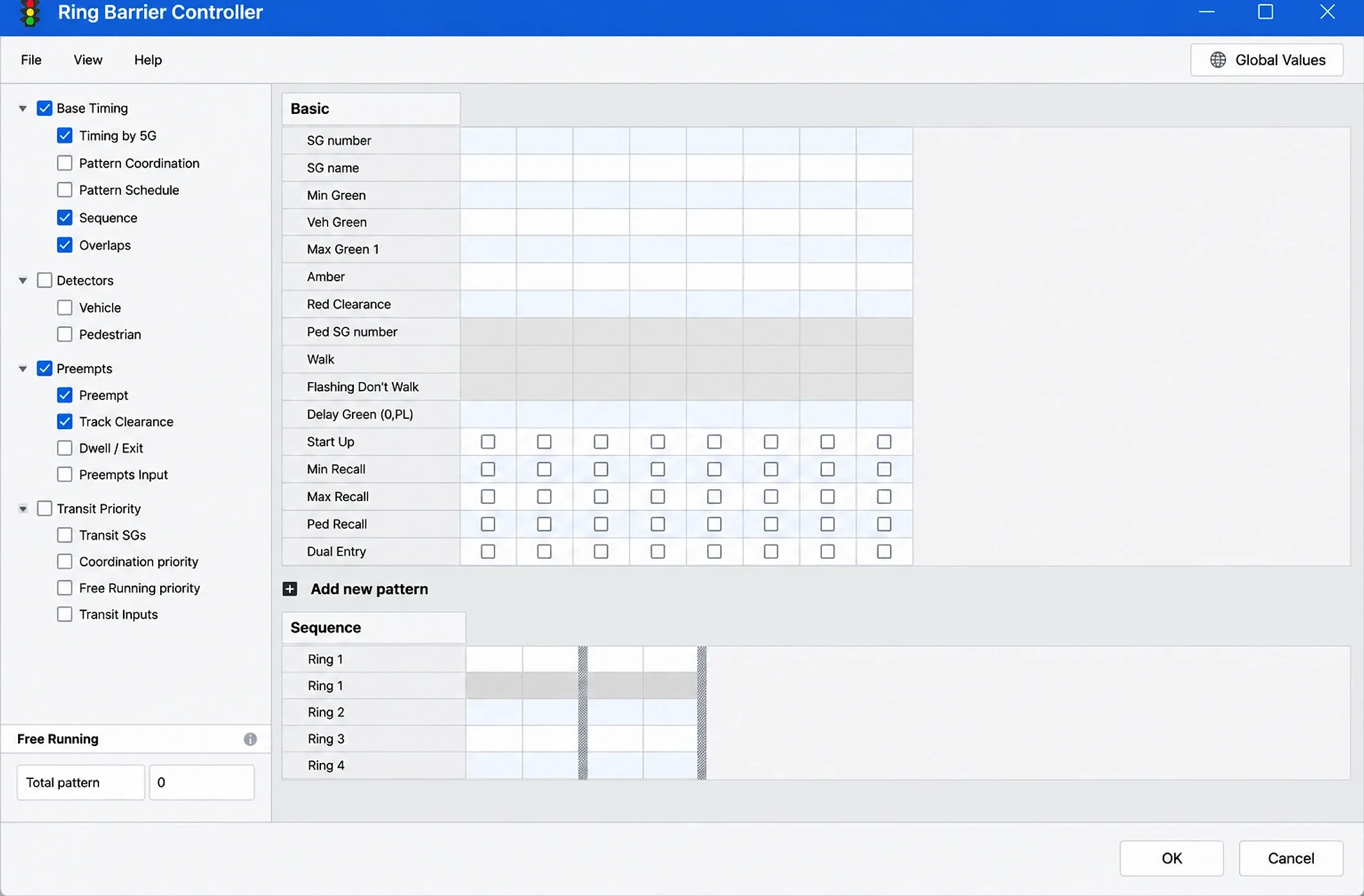
A German traffic-control operator relied on a dated desktop interface backed by a monolith that was costly to maintain.
We rebuilt the application as modular, cross-platform components and migrated one workflow at a time. The old and new systems ran in parallel throughout the transition, so existing operations and integrations continued working.
Results
- Improvement in UI usability
- 30-40%
- Improvement in rendering performance
- 25-35%
- Backward compatibility
- 100%








Start with a modernization plan you can fund
Every engagement begins with a fixed-price assessment and ends with a written plan. After the assessment, we recommend the delivery path that fits your system, including no further engagement if none of the options make sense.
Modernization assessment
Build a roadmap before committing to the migration
Map the system, identify the risks and compare costed delivery options.
- Commercial model
- Fixed price, including the roadmap and costed options
- Typical duration
- 3-5 weeks
-
Incremental migration
Modernize the system without stopping it
Replace the legacy platform slice by slice, with a delivery gate and rollback path for every release.
- Commercial model
- Phased delivery, approved and funded by slice
- Typical duration
- 6-18 months
-
Re-platforming only
Keep the business logic. Move the runtime.
Move the application to a supported platform while preserving the business behavior that already works.
- Commercial model
- Fixed-scope re-platforming and modernization
- Typical duration
- 8-16 weeks
Certified, accredited and independently reviewed

Explore other services
All servicesFrequently asked questions.
Something not covered here? Ask an engineer directly, no SDRs, no funnel.
Why not just rewrite it?
Because the old system keeps changing while you write the new one, and the day of the switch carries all the risk at once. Incremental migration spreads that risk across many small, reversible steps.
How do you avoid breaking behavior nobody documented?
Characterization tests. We capture what the system actually does, including the parts nobody intended, before we change anything.
Can you work with COBOL, Delphi or Oracle Forms?
Yes. The constraint is usually access to the runtime and the data, not the language.
How long does this take?
Assessment in three to five weeks. Migration is measured in slices rather than one date. Most programmes run six to eighteen months with value shipping throughout.
What happens to our team?
They stay central. We work alongside them and hand over as slices land, so operating the new platform is not a surprise at the end.
Let's Work Together
German engineering discipline meets agentic delivery. Send a short note and we'll reply within one business day, straight to an engineer, no SDRs, no funnel.
- Email[email protected]
- Phone(+84) 246.276.3566
- Response TimeWithin 1 business day