Deep learning for computer vision gives software a way to learn from images and use those patterns to make predictions. In a sorting system like that, it means identifying an item and finding its position on a moving belt.
But choosing a model takes more than finding one that recognizes the right object. First, decide whether your application needs to know what type of object is present, where it appears in the image, or what shape and area it covers. That choice determines how you label the training images and how you evaluate the model’s results.
This guide explains how deep learning models learn from images and how their outputs differ. It then walks you through choosing and adapting a model, with practical checks for accuracy, speed, and cost.
What is deep learning for computer vision?
Deep learning for computer vision uses neural networks, models with many layers of connected calculations, to learn patterns in images or video. During training, the model adjusts values called parameters to improve its predictions against a defined goal.
Computer vision is the broader field of getting useful information from images and video. Deep learning is one way to do that. Other methods use image operations or rules based on geometry.
Features are properties or patterns used to solve a task, such as an object’s shape or color. Some machine-learning methods use features an engineer has chosen. A deep model learns features from training examples as part of its task. Other machine-learning methods also learn from data. The main difference is how they use or learn those features.
You still define the task and decide what counts as a useful answer. The image must show enough detail for the model to judge it. If the camera cannot see the feature you need, collecting more images of the same view will leave that gap in place.
How deep learning models learn from images

Training changes how a vision model responds to images by adjusting values called weights.
A neural network passes image values through layers of calculations. A convolutional neural network, or CNN, applies filters across small image regions. These filters are sets of learned values that respond to patterns. Later layers combine those responses into features that help with the task.
A CNN learns patterns at different levels. Early layers often respond to edges and textures, while later layers combine those responses into more complex features. What it learns depends on the data and training goal. Learned features do not always have a simple name or a direct match to an object a person recognizes.
In supervised training, you provide each image with the answer the model should learn, such as a category label or an object’s location. The model makes a prediction, and a loss function measures how far it is from that answer. Training then adjusts the weights, the values that control how the model processes an image, to reduce that loss. Repeating this process across training examples helps the model learn patterns that support the task.
After training, inference means using the learned model on a new input. New images alone do not change its weights. When conditions change, test the model again to decide whether you need to retrain or replace it.
Preparing the image is part of this process. The difference between computer vision and image processing helps explain the roles. Resizing or adjusting an image prepares the input, while the vision model predicts an answer from its content. Follow the model’s input requirements during training and use.
Choose the right computer vision task
Choose the computer vision task that gives your application the answer it needs. The table below compares each task’s output, the labels required for training, and the errors to check:
| Task | Model output | Training labels | Errors to check |
| Image classification | Category for an image or region | Category labels | Wrong or missed categories |
| Object detection | Object classes and bounding boxes | Box annotations | Missed objects and location errors |
| Semantic segmentation | Class assigned to each pixel | Pixel-level class masks | Incorrect regions or boundaries |
| Instance segmentation | Separate masks for individual objects | Individual object masks | Merged or missed objects |
For example, use classification to name the category in a cropped product image. Use detection to find where the objects are. Segmentation gives you their shape or the area they cover.
That need for position shaped our conveyor sorting project. A manufacturer needed to know what material was on a moving belt and exactly where it was. The system also had to sustain at least 14 frames per second from each of two cameras.
YOLO stands for You Only Look Once, not You Only Live Once :). We used a YOLO detection model to identify the material and locate it. TensorRT, a tool for optimizing and running inference, optimized the model.
The model’s position output fed the existing programmable logic controller, or PLC. The PLC timed the reject mechanism. A whole-image category would have left the controller without the position it needed.
Other vision tasks need different outputs. Pose estimation locates keypoints, specific points on an object, such as a person’s joints. Tracking links observations of the same object from frame to frame. Image generation and enhancement create or change images. Our computer vision examples show how you can use these outputs.
Compare deep learning models for computer vision
Compare models by how they process images and what they return. Start with CNNs and vision transformers, then look at models built for detection and segmentation to find the output your application needs.
CNNs and vision transformers

CNNs apply the same learned filters across image regions to extract features. ResNet and MobileNet are two families of CNNs with different design priorities.
ResNet, short for residual network, uses shortcut connections that carry information past some layers, making deeper networks easier to train. MobileNet focuses on reducing processing and memory demands, making it suitable for phones and other devices with limited resources.
Both families include different model versions. Compare the specific versions on your task and hardware to check their accuracy, speed, and resource needs.
Vision transformers, or ViTs, divide an image into patches, or small image sections. Attention determines how strongly information from one patch influences another. For example, a patch showing part of an object is considered alongside patches showing other parts of the image. This helps the model use information from different image regions when producing an answer.
Pretrained weights are values a model learned in an earlier training run. You can start with these weights for either a CNN or a transformer, so neither choice forces you to train from scratch.
Compare models that support the same task. Check which weights they use and how they expect you to prepare the images. Then test those versions on your own data to see whether their reported strengths hold up for your task.
Detection and segmentation models
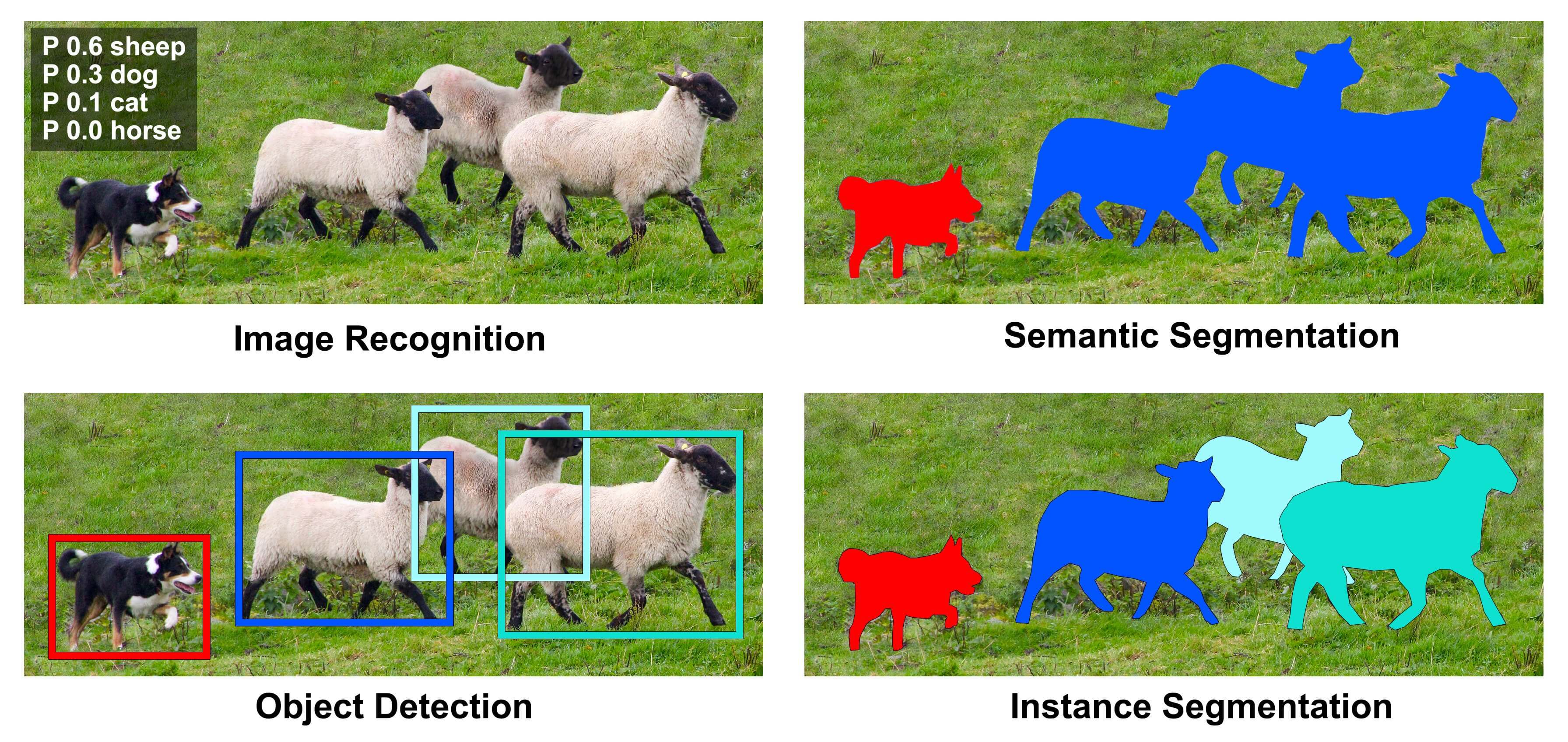
Detection models predict object classes and locations. YOLO and Faster R-CNN are examples. R-CNN refers to a region-based convolutional neural network, which uses proposed image regions to detect objects. A detector’s backbone is the part that extracts image features. The architecture varies by detector. Some use CNNs, while others use a different design.
Segmentation models give you pixel-level results. U-Net is a common architecture for semantic segmentation, which assigns a class to each pixel. Mask R-CNN combines detection with masks for separate objects. Choose between those outputs based on whether you need class regions or distinct object shapes.
| Model or family | Role | Typical output | What to check |
| ResNet | CNN architecture | Image categories | Quality and processing demands of the chosen variant |
| MobileNet | Compact CNN architecture | Image categories | Resource limits on the target device |
| ViT | Transformer architecture | Image categories | Pretrained weights and processing requirements |
| YOLO / Faster R-CNN | Detection models | Classes and bounding boxes | Detection quality and response speed |
| U-Net | Segmentation architecture | Pixel-level class masks | Labeling effort and boundary quality |
| Mask R-CNN | Detection and segmentation model | Separate object masks | Instance detail and processing cost |
The tools around a model do different jobs. Once you have chosen the output, check that the model works with your tools and target hardware.
Use transfer learning with the right data
Transfer learning starts with a model that has learned from another dataset, a collection of training examples. To adapt it to your task, decide which weights to update and prepare data that reflects how you will use the model.
Fine-tune a pretrained vision model
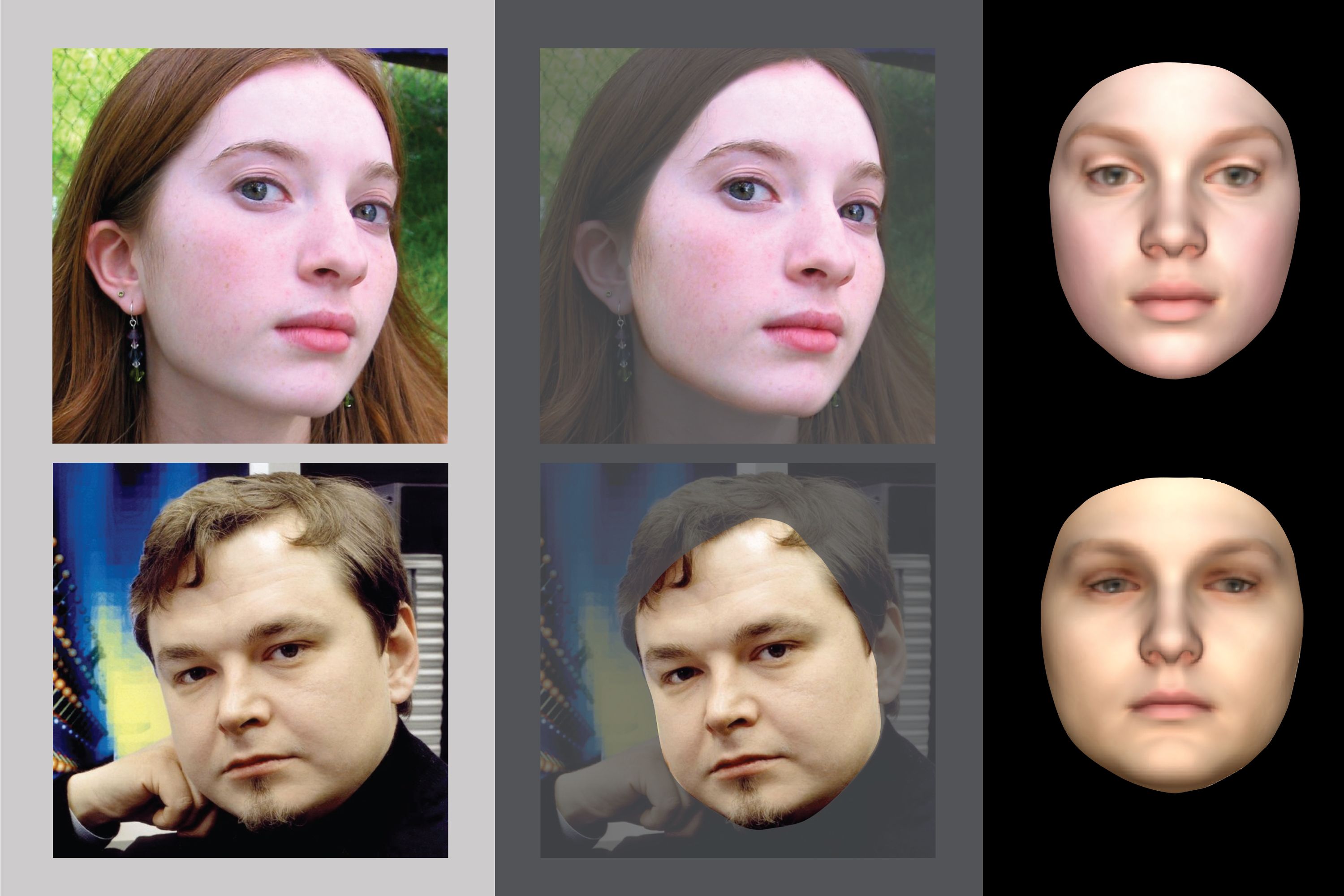
A feature extractor is the part of a model that turns an image into features for the task. You can keep its pretrained weights fixed and train only a new output layer, the part that produces your prediction. The model then learns to use the existing features for your task. Fine-tuning takes the adaptation further by updating some or all of the earlier weights as well.
Keeping more weights fixed reduces how much of the model you train. It may also limit how well the model adapts to images unlike its earlier data. Updating more weights gives it more room to change. It also adds training work and can fit a small dataset too closely.
PyTorch’s transfer-learning tutorial uses around 120 training images per class and 75 validation images per class for an ants-versus-bees example. Those counts belong to a narrow learning exercise. They do not set a minimum for a system in real use.
Instead of treating those counts as a target, look for gaps in what your data shows. More near-identical pictures do not necessarily address the conditions the model handles poorly. For example, if it fails on objects in shadow, adding only bright-light images leaves that condition out of the new training data.
Prepare labels and split your training data
Labels tell the model what you want it to learn. Classification uses categories, while detection usually needs object locations. Pixel masks describe regions within the image, so they take more detailed labeling work.
Write labeling rules before growing the dataset. If reviewers give the same image different labels, agree on the rule for that case. A clear target makes it easier to train and judge the model.
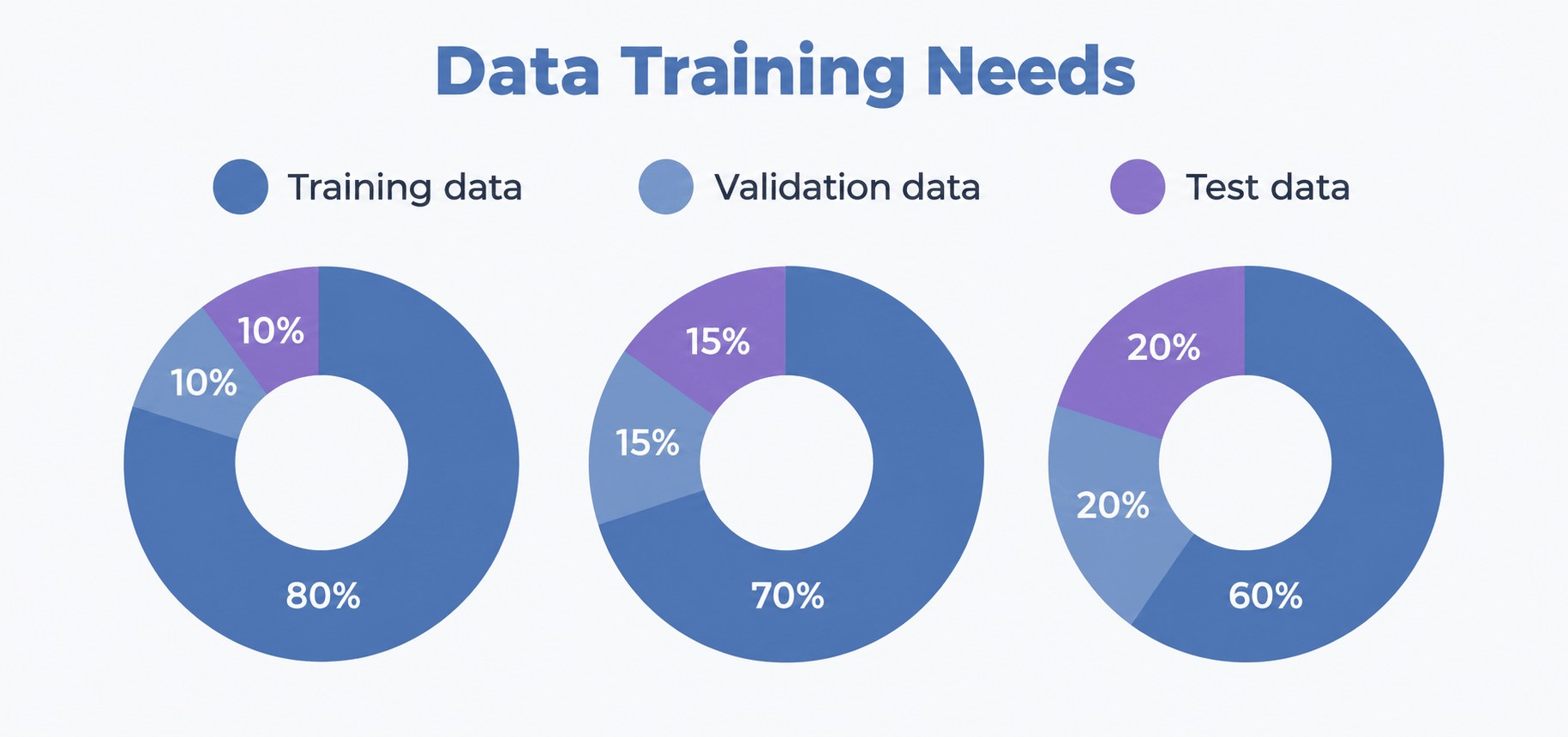
Keep training, validation, and test data separate. Training adjusts the model’s weights, while validation guides your choices during development. Use a held-out test set to check the final candidate.
Group closely related samples before you split the data. For example, nearby video frames and repeated pictures of the same item often look much alike. If they appear in both training and test sets, the test can look easier than the task in real use.
Augmentation creates variations of training images, such as changes in brightness or orientation. Use changes that preserve the task’s meaning. If a change moves the object or changes the right answer, update its label too. You still need real examples of conditions missing from your data.
When choosing images for the dataset, also check that you have permission to use them and that they suit the intended use.
Test model accuracy, speed, and cost
Compare models on the same task under conditions that reflect real use. Judge each candidate against your error and speed limits, and include the cost of preparing data and keeping the model working.
Measure the errors that matter
A false positive reports the condition you want to detect when it is absent. A false negative misses that condition when it is present. Agree on limits for each based on what those errors would cause in your application.
For classification, check errors for each category. A high overall score can hide poor results for a rare but important class. Precision tells you how often positive predictions are correct, while recall tells you how much of the relevant class the model finds.
Detection also needs location checks. A correct label with a misplaced box fails the task if your application needs an accurate position. For segmentation, check the regions and boundaries that matter to the task.
Review actual errors alongside the scores. A confidence score expresses how strongly the model favors a prediction. It does not guarantee the answer is correct. The acceptance threshold is the cutoff you set for using that result. Raising or lowering it changes which predictions are accepted and affects the balance between missed cases and false alerts.
Test your model on real-world images
Test the range of lighting and viewpoints the camera will see. Include object variants and obstructed views too. Mark cases where the image itself lacks enough detail for a reliable answer. Compare each prediction with the correct result recorded for that test image.
Record prediction errors separately from failures in the action that follows. A wrong label or misplaced box is a prediction error. For a correct result, check that it arrives in time and leads to the intended action. For a record update, check that the result is stored against the right item. Trace the failure before choosing a fix.
Review new samples as conditions change. Decide who handles uncertain results and what would trigger a model update. When performance falls outside the agreed limits, someone needs a clear action to take.
Measure model speed on your hardware
Inference latency is the time a model takes to process an input. Throughput is how many inputs it processes over a period. The application’s full response time includes other work too, such as moving the image and passing on the result.
Measure latency, throughput, and full response time on the hardware and settings you plan to use. Record image size and the number of inputs the system handles at once. A speed test on another device does not establish performance on yours, so keep those conditions the same when you compare models.
Changes that make a model faster can affect its output. When resizing removes a small detail, the model loses visual evidence it needs. Check quality again after changing the image preparation or optimizing inference.
Compare with a simpler vision method
For a tightly controlled task, test a simple rule-based method first. If the goal is to check that a visible mark sits within a fixed region, start with a basic position check. Compare its results with your acceptance rules before adding a learned model.
Use the same acceptance rules for both approaches. Include the work of collecting and labeling data in setup costs. During use, account for reviewing results and updating the system. When new data exposes performance problems, assess whether the learned model needs retraining. Traditional methods also need upkeep when their assumptions change.
For factory systems, our article on computer vision for industrial quality control explores the wider deployment context. The cost of an error and the work of keeping the system reliable should also belong in your model comparison too.
A tested model still needs to work inside your application. Our AI & data platform services cover vision-model testing and deployment. We agree on error and speed limits with your team, then track how the model performs in use.
Choose a computer vision model that fits your task
Deep learning for computer vision is useful when the model’s output supports a clear task. Recognizing an item, finding its position, and outlining its shape each serve a different purpose. The choice becomes clearer once you know which answer your application needs.
From there, compare a small shortlist on your own images and hardware. Check whether each model meets your error and speed limits, then weigh the cost of preparing data and keeping the model reliable. Use those results to choose a model you can maintain before you commit to a larger build.