In late July 2026, a cyberattack targeting CEVA Logistics’ warehouse management systems disrupted operations across eight European distribution centers. The incident delayed and canceled orders while also exposing customer data, showing how a security breach in logistics management software can quickly extend beyond a single company and affect multiple businesses across the supply chain, according to The Record.
For logistics businesses, the incident highlights a broader question about the software behind critical operations: should you buy logistics management software or build it in-house? The answer can affect more than the initial implementation cost. It also shapes how much control a business has over integrations, customization, scalability, security, and long-term maintenance.
This guide compares the buy and build approaches and examines the trade-offs of each option when you choose logistics software development for your business.
What is Logistics management software?
Logistics management software is the set of tools that keep a supply chain running end to end. It spans several categories, with each one solving a different part of the problem:
| System | What It Handles |
| TMS (Transportation Management System) | Carrier selection, rate shopping, and routing |
| WMS (Warehouse Management System) | Inventory, picking, and fulfillment |
| OMS (Order Management System) | The order lifecycle, from placement to delivery |
| ERP | Financials and broader business operations |
| Telematics | Vehicle and shipment tracking |
Most operations run several of these side by side rather than one unified platform. For example, a mid-sized third-party logistics (3PL) provider might use:
- TMS to book and track freight
- WMS to manage warehouse inventory and fulfillment
- OMS to manage customer orders
These systems may operate separately while sharing data across the same logistics workflow. So, before choosing a solution, identify:
- Which logistics processes the software needs to support
- Which systems your operation already uses
- How these systems need to integrate
Once you know which systems your operation needs, you can compare vendors more effectively. From there, you can decide whether existing logistics management software is enough or if you need a more customized solution.
5 Signs Your Logistics Management Software Has Reached Its Limits
These five signs can help you spot the problem before it gets worse.
Spreadsheets and Email Are Creeping Back In
When teams repeatedly rely on spreadsheets or email for tasks that logistics management software should handle, it may indicate that the platform no longer meets their needs. Occasional workarounds are normal, but recurring ones can reveal gaps in the system’s capabilities.
Split shipments are one example. Some order management systems (OMS) struggle to track orders shipped in multiple batches, forcing dispatch staff to update customers by email instead. When this becomes routine, email can quietly replace the platform as the system of record.
Every New Integration Requires a Change Order
An occasional integration request is normal. However, if each new connection requires vendor changes and extra fees, a growing backlog may signal mounting integration debt.
This can mean your logistics management software is struggling to connect with the systems your business now relies on. As your operation grows, those gaps can lead to more delays and higher costs.
Inventory or Shipment Data Does Not Match Across Systems
Integration problems also appear directly in your data when the two systems communicate. For example, the warehouse management system shows a different inventory quantity from the order management system.
When data between systems does not stay synchronized, your teams will have to reconcile records manually. Over time, this extra work can become routine. That means you are doing the work your logistics management software was originally designed to support.
The Platform Cannot Meet Compliance or Security Requirements
Data inconsistencies can often be managed with manual reconciliation. Compliance gaps are harder to work around.
Regulated logistics environments, such as airports and pharmaceutical cold chains, may have audit and safety requirements that general-purpose logistics management software cannot support natively. When teams need custom workarounds to meet these requirements, the platform may no longer be suitable for the operation.
Software Costs Are Growing Faster Than the Business
When logistics management software uses seat-based pricing or per-shipment fees, costs can rise as the team grows or shipment volume increases. A seat-based plan that seems affordable for a small team may become significantly more expensive as the business scales.
If software costs continue to rise faster than the business can justify, it may be time to reconsider the current pricing model or look for a more scalable logistics management software solution.
The real cost of buying vs. building logistics management software
Four cost drivers compound on each path, though they don’t always have a matching counterpart on the other side:
| Cost driver | Buying off-the-shelf | Building custom |
| Cost curve shape | Rises with usage: per-seat and per-shipment pricing creates a cost curve that scales with the business rather than against it. | Front-loads into design and delivery, then flattens. |
| Primary upfront cost | Implementation and onboarding, which typically run well past the subscription itself. | Discovery and architecture scoping is where the real upfront investment goes. |
| Integration cost over time | Customization and consulting fees scale with how far the platform has to bend away from its default workflow. Each new integration adds its own recurring cost. | Integration designed in from the start avoids the recurring integration-debt tax that off-the-shelf platforms carry. |
| Lock-in vs. ownership | Switching cost, retraining effort, and contract exit clauses grow every year you stay. It is the lock-in mechanism most vendors are quietly built around. | You own all the data model and the resulting intellectual property. |
Buying and building diverge the most on that last line: one path rents the data model, the other owns it.
Neither side of that table has a matching data point for the other, so the specifics are worth spelling out separately.
The published cost of buying logistics management software
Buying covers a wide range of costs, shaped entirely by how much customization the operation needs.
| Platform Type | Monthly Cost | Implementation Cost |
| SaaS TMS | $500 $2,500/month (or $2–$5 per load) | $10,000 $75,000 |
| Mid-market WMS | $2,000 $8,000/month | $30,000 $120,000 |
(Source: Sheer Logistics TMS cost data and Incora WMS cost data)
Achieving cost savings after go-live often requires further investment. For example, Aptean reports that automating invoice audits reduced processing costs from $7.75 to $1.05 per invoice. The company also found that broader workflow automation cut the time spent on the overall shipping process by 28%. However, these savings may require additional automation or customization when the existing platform cannot support the necessary workflows out of the box.
The cost of building custom logistics management software
Partnering with a custom software development company to build logistics management software does not come with a fixed price. The total cost depends on the operation’s requirements and the integrations needed. However, releasing the software in short, iterative stages rather than through one long development cycle helps reduce upfront risk and allows businesses to evaluate progress before committing more budget.
At Eastgate, that same pattern holds. We’ve kept 93% of clients across engagements, including the kind of supply chain work where a procurement workflow automation project cut lead times by 30 percent and procurement costs by 15 percent.
However, building custom logistics management software is not always the more cost-effective option. It becomes more attractive when integration requirements reach a point where the recurring costs and limitations of off-the-shelf platforms outweigh the investment in a custom solution.
Counting your integration-debt threshold: the number that decides build vs buy
The build-versus-buy decision for logistics management software often comes down to one factor: how many systems the platform needs to keep in sync.
As your logistics operations grow, they can include TMS, WMS, and OMS, along with ERP software and telematics tools. The tipping point comes when these integrations exceed what the platform’s core workflow was designed to orchestrate.
As a result, many logistics software problems that are blamed on “the vendor” are actually symptoms of a deeper integration issue.
| Symptom | Root cause | Flawed assumption | The fix |
| Support tickets keep rising for the same handful of integration points. | Most off-the-shelf logistics platforms are built around one dominant workflow, such as a TMS, WMS, or OMS core, so every other system connects through middleware or point-to-point integrations rather than the platform’s native data model. | Buying is assumed to be cheaper because the vendor has already absorbed the engineering cost, which holds for the first two or three integrations but breaks down once the same connection needs its own fix after every vendor update. | Track which one or two integration points generate most of the repeat tickets. That concentration is the signal that connection was never built to carry. |
| The backlog of customization requests keeps growing instead of clearing. | Many backlog items are not bugs. They are requests for the platform to support a workflow it was not designed around in the first place. | Treating the backlog as a staffing problem, assuming more support headcount will clear it, when most items actually need the platform’s core data model to behave differently. | Split the backlog into genuine defects and requests that are really asking the platform to act like a different system. A backlog dominated by the second kind is an integration-debt signal. |
| Conversations about connecting one more system keep coming up. | Each integration request gets evaluated on its own, with nobody tracking how the total integration count is trending over time. | Assuming the next integration is a one-off, the same as the ones before it, when the pace is actually accelerating as the operation adds channels, partners, or warehouses. | Track the integration count the same way the budget gets tracked, as a running number, so crossing the threshold shows up as a metric instead of surfacing in another ad hoc conversation. |
When real-time data exchange is required between four or five core systems, integration costs can increase significantly. At that point, building and maintaining a custom integration layer may cost less than adapting an off-the-shelf platform to handle the same workload.
When that threshold is close, the choice isn’t only buy versus build from scratch. Our system integration team connects ERP platforms like SAP or Dynamics 365 to the TMS, WMS, and OMS systems around them. That custom layer handles exactly the integrations an off-the-shelf platform wasn’t built to carry.
Buy vs. Build vs. Hybrid: Which Path Fits Your Logistics Software?
Each approach comes with different trade-offs. The right choice depends on your operational priorities and how much flexibility your logistics software needs over time.
| Criteria | Buy | Build | Hybrid |
| Speed to deploy | Fastest, often within weeks | Slowest, with months to the first release | Moderate, with the platform deployed quickly and integrations added in phases |
| Integration flexibility | Limited to the vendor’s marketplace | Highly flexible and built to specification | High for custom connections, but still constrained by the platform core |
| 5-year cost curve | Increases with seats and integrations | High upfront cost, then flattens over time | Moderate upfront cost, with slower growth than a pure buy approach |
| Compliance and data ownership | Primarily controlled by the vendor | Fully owned by the business | Partially owned, depending on the integration layer |
| Dependency | Dependent on the vendor’s roadmap | Dependent on internal teams or partners | Shared between the business and the vendor |
For logistics operations that are still below their integration-debt threshold, hybrid is often the most practical option. The business can keep the platform for workflows it already handles effectively. At the same time, a custom integration layer can connect the systems that fall outside the platform’s original capabilities.
This approach avoids replacing the entire logistics management software stack while still giving the business more control over its integrations.
Mission-Critical Logistics Operations and the Integration-Debt Threshold
Hybrid works well for logistics operations that are approaching their integration-debt threshold. However, mission-critical environments often reach that threshold much sooner. Airports, ports, and other mission-critical logistics operations typically face stricter compliance and uptime requirements. As a result, their integration needs can grow rapidly even before the operation reaches significant scale.
Once a logistics environment becomes mission-critical, three factors become especially important.
- Regulatory and safety requirements can require direct, auditable connections to systems that general-purpose logistics software was never designed to support. In these environments, relying on a standard vendor connector may not be enough to meet operational or compliance requirements.
- Uptime requirements also change the cost of limited integration flexibility. When a vendor’s integration marketplace does not support a required connection, the issue can become a direct operational risk.
- Asset lifecycle and compliance tracking may also need to be built into the core workflow from the beginning. Adding these capabilities later as an afterthought can create gaps that only become visible when an audit or operational failure exposes them.
Our work on an airport baggage-handling system provides a direct example. The project involved a mission-critical logistics environment with strict integration requirements and real-time safety tracking across multiple operational stakeholders. These requirements made a custom logistics software solution a better fit than an off-the-shelf platform.
This type of challenge is not unique to a single project. We place Forward Deployed Engineers directly within client operations, primarily across logistics as well as smart mobility, manufacturing, and MRO.
For these teams, integration requirements are not theoretical. They are part of the operational environments our engineers work with every day.
The build-vs-buy mistakes most teams make
Knowing your integration-debt threshold is only half the decision. Once teams understand where they stand, they still need to avoid the same mistakes when choosing how to move forward.
Comparing Logistics Software Costs by Sticker Price
The cheapest logistics software in year one is rarely the cheapest option by year three. Integration and customization costs can continue to accumulate on top of the base subscription.
That is why a five-year total cost of ownership (TCO) model can tell a very different story from the price shown on a vendor’s website. The model should account for the integrations, customizations, and ongoing costs the operation is likely to incur over time.
Treating Logistics Software Migration as a One-Time Cost
Migration does not end when the new logistics software goes live. A realistic five-year cost model also needs to account for what happens after implementation.
Data migration risk can resurface with every vendor price increase, feature deprecation, or forced platform upgrade. Each change can introduce new costs or operational disruption. As a result, treating migration as a problem solved during the initial rollout can leave teams revisiting the build-vs-buy decision only 18 months later, under less favorable conditions.
Overlooking Data Ownership and Portability Requirements
Before signing a contract, clarify who owns the data model and how easily the business can export its data in a clean, usable format. This should be addressed upfront rather than after a compliance audit raises the issue. Contracts that do not clearly define data portability can even lead to the outcome that the business eventually needs to move away from the platform.
Skipping a Phased Pilot Before Full Implementation
Both migration and integration risks are easier to identify early than after a full rollout. That is where a phased pilot can make a difference.
Whether the operation chooses to buy or build, testing the most integration-heavy parts of the workflow on a limited scope can provide valuable cost and feasibility data. A 30- to 60-day pilot focused on the two or three most challenging integrations can reveal the real cost of either approach before the full budget is committed.
Assuming Pre-Built Connectors Cover All Integration Needs
A pilot is only useful if it tests the integrations the operation actually needs. For that reason, the vendor’s definition of “integration” deserves scrutiny.
A marketplace of pre-built connectors does not necessarily mean the platform offers the integration flexibility a logistics operation requires. If a critical connection is missing from the marketplace, the actual cost may be the fee charged by the vendor or an approved consultant to build it as a custom integration.
Clarify this before signing the contract. Ask the vendor to demonstrate the exact integration the operation needs rather than relying on a future roadmap promise. Marketplace pages can make integration coverage appear broader than what has actually been built and deployed.
The same principle applies when choosing an IT outsourcing partner. Seeing how a partner works in practice can provide a much clearer picture than relying on claims made in a pitch deck.
5-Year TCO Model for Logistics Software: Buy vs. Build
Compare the five-year cost of buying and building using the same five line items:
- License, subscription, or development cost
- Implementation and onboarding, or discovery and architecture cost
- Per-integration cost (number of systems multiplied by the average integration and maintenance cost per system)
- Ongoing maintenance and vendor price escalation, or internal team cost for the build path
- Estimated migration or exit cost if the path needs to change later
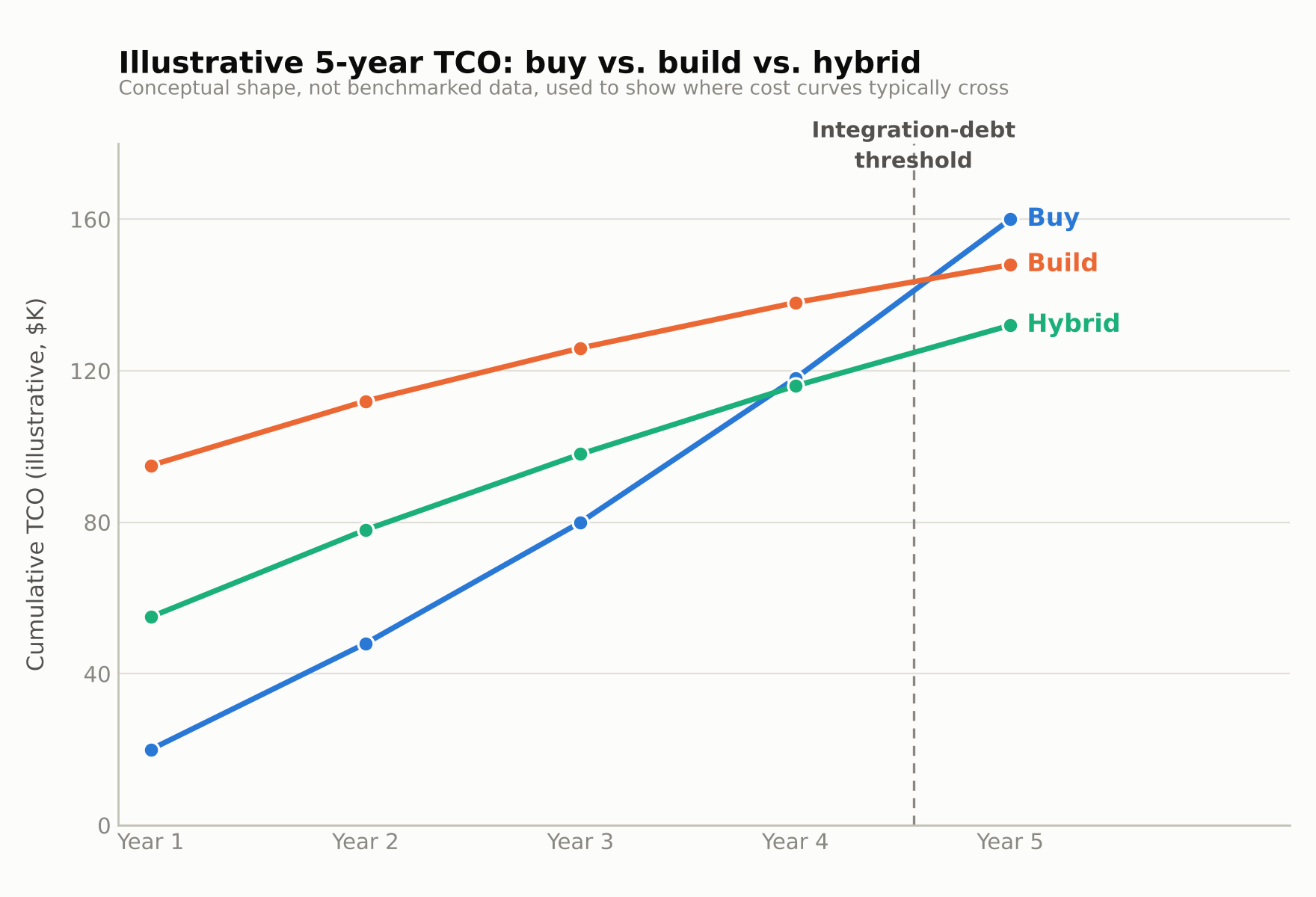
Building this model takes real data about your own stack, which not every team has time to pull together internally. Our logistics infrastructure practice runs fixed-price technology assessments that audit a logistics software stack in four to eight weeks. The output is exactly this kind of integration count and cost breakdown.
Final thoughts
The buy-versus-build decision for logistics management software depends on how much integration debt your operation can manage and what each option will cost over five years. Feature lists and per-seat pricing tell only part of that story.
The pressure can build quietly until a change-order backlog, compliance gap, or unplanned migration exposes it. Comparing costs before your next renewal helps you spot that pressure early and plan your next move.
Engineers who have worked directly with logistics operations can help make that comparison more realistic by accounting for the integration work, maintenance, and operational constraints that a vendor quote may leave out.