A payment succeeds, but the order stays pending. Stock remains available on another sales channel, and your team has to work out what happened before it ships anything.
E-commerce workflow management coordinates the systems involved in a sale and handles failures between them. Plugins still handle useful tasks, but the surrounding workflow needs clear rules for data exchange and recovery. Higher sales volume alone doesn’t justify replacing a supported extension.
Start with the transaction that breaks. Trace it across order, inventory, and payment systems, then add the controls needed to complete or reverse it safely. Often, the storefront stays in place while you modernize the workflow around it.
When does an e-commerce store outgrow its plugins?
Your store outgrows its plugin setup when the supported features no longer fit how you sell. Look for errors that keep returning after you fix the settings and check that the plugins are compatible. Staff should not have to repair the same records each day.
The number of plugins says little about whether a sale will complete. A few plugins that change the same records without clear rules are enough to cause errors. Software systems integration connects those responsibilities across applications and defines how business data moves between them.
Shared records create overlapping responsibilities
A checkout extension creates an order. A payment extension updates the payment status, while an inventory extension reserves stock against the order. Each plugin needs rules for which fields it owns and which changes it accepts.
Without those rules, an update from one extension risks overwriting another’s work. A plugin update that changes a data structure or application programming interface (API) also risks breaking a connected shipping service. An API is the interface through which one application requests data or an action from another.
Repeated corrections reveal workflow gaps
Check whether your operations team repeatedly encounters these failures:
- Duplicate deductions. A repeated stock event reduces inventory twice.
- Invalid confirmations. An order moves to confirmed before the required payment condition is met.
- Stuck reservations. Canceled orders continue to hold stock.
- Channel mismatches. Marketplace listings fail to reflect website purchases.
- Refund conflicts. Payment and order records disagree about a refund.
These failures call for rules that control the sale. Faster stock updates won’t stop a request from running twice or an order from moving to the wrong state.
Customization starts to obstruct maintenance
Keep standard plugins when their features fit your store. If you split shipments or approve payments under special rules, check how the plugin handles each case.
If every update requires you to repair custom logic, the extension has become expensive to maintain. Compare the cost of those repairs with the cost of building and running a service that owns the rule.
Troubleshooting crosses team boundaries
Slow processing is a performance issue. Silent failures and conflicting records are reliability issues, even when each application responds quickly.
Map who owns each handoff before adding another extension. Your team needs to identify where a transaction stopped and who owns its recovery.
Product listings rely on the same records. Prices and stock must stay current wherever shoppers find them, including new AI shopping interfaces. That’s why you need to make your Shopify catalog AI-agent-ready for 2027. However, those listings are only as current as the data sent to them.
Why connected e-commerce workflows fail
A purchase gets stuck when connected systems disagree about who owns a record or how to handle a late update. For example, the payment gateway finishes its part while the order still waits for stock.
Define the system of record for each business fact
A system of record holds the value that other systems treat as the source of truth. It owns that part of the record. Other systems follow its rules when they use or change the value.
| Business data | Possible system of record |
| Product information | Product information management system |
| Available inventory | Inventory system or enterprise resource planning (ERP) system |
| Order status | Order management system |
| Payment status | Payment provider, reconciled with internal transaction records |
| Customer information | Customer relationship management (CRM) system or customer data platform |
| Shipment status | Warehouse or fulfillment system |
An ERP system keeps business records such as stock and purchasing linked. A CRM system manages customer records. Assign ownership to each part of a record, rather than letting every system change it. For example, the order service owns order status. Its payment information must reflect the provider’s record.
Account for failures at each API boundary
Each direct connection needs an owner who checks how it maps data and handles errors. When the same rule appears in several connections, a change to that rule means fixing each one.
Your integration design should account for:
- Rate limits. External services restrict how many requests they accept.
- Network timeouts. A request completes remotely, but its response fails to reach your application.
- Service outages. A dependency becomes temporarily unavailable.
- Missed notifications. A webhook arrives late or never reaches its destination.
- Access failures. Expired credentials or incorrect permissions stop data exchange.
Synchronous processing waits for a response before it continues. Asynchronous processing sends work through a message or event for another service to handle. At checkout, show whether payment is complete or still pending. Updating a CRM record usually doesn’t have to delay the shopper.
Make recovery part of the workflow
A failed response doesn’t establish that an operation failed. Before retrying, determine whether the original operation already took effect.
| Recovery control | What it does |
| Idempotency | Prevents retries of the same logical operation from repeating its business effect |
| Transaction log | Records operation identifiers, states, and outcomes |
| Retry policy | Defines which failures to retry and when to stop |
| Reconciliation | Compares records to find missing or conflicting updates |
| Dead-letter queue | Holds messages that exhausted their processing attempts |
| Exception handling | Assigns unresolved transactions to someone who can investigate |
These controls show which parts of the sale finished and which still need attention.
Build reliable e-commerce order management workflows
An order needs rules for how it moves from one state to the next. Record what permits each change and what state follows. If a step fails, the workflow must retain enough detail to resume or reverse it safely.
Define order states and transition rules
Before you start fulfillment, check that the order meets your payment and stock rules. Some stores approve payment before holding stock. Others hold stock first. The order of these checks must match your business policy.
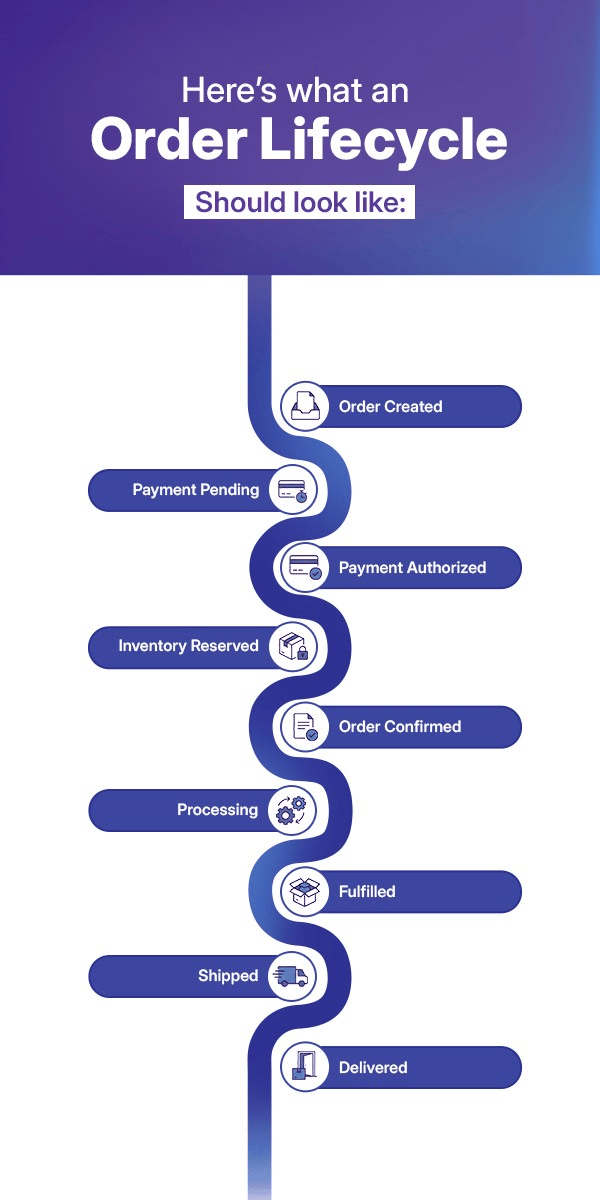
Example sequence. Payment and stock policies determine the order of checks.
| Stage | Condition to verify |
| Order created | The request is valid and has a unique reference |
| Payment pending | The payment outcome is still unresolved |
| Payment authorized | The provider confirms the required authorization |
| Inventory reserved | Eligible stock is held for this order |
| Order confirmed | All required payment and inventory conditions are met |
| Processing and shipment | Fulfillment records show the order’s progress |
| Delivery | The fulfillment system records the relevant delivery confirmation |
Set rules for canceled orders and refunds too. Release stock holds when the order is eligible for release. Keep each refund linked to the original payment and record whether the provider has finished it or reported a failure.
Keep payment, fulfillment, and refund states separate. An order might have shipped even while a refund is still pending. One status field would hide part of that history.
Prevent duplicate orders with idempotency
Idempotency means that a retry doesn’t cause the same change twice. If a shopper submits checkout twice, the backend recognizes the first request and returns its stored result.
Give each intended change a unique identifier and reuse it on retries. A fresh identifier for each attempt would make the retries look like new requests. Use the same rule when creating orders or holding stock.
Stripe supports idempotent API requests. The API version and the time Stripe retains a key affect retry behavior. Your order service still needs its own checks to stop duplicate orders.
Use events where delayed processing is acceptable
A command asks a service to act, such as reserving stock. An event records something that happened, such as stock being reserved. The service that acts publishes the corresponding event.
A payment service publishes a payment-authorized event after authorization succeeds. The order workflow then requests a stock reservation. Once all conditions are met, it confirms the order and notifies fulfillment.
Events reduce the need for direct calls between services. They still depend on the event format and how messages reach each service. Until all services process an update, their records differ. This delay before records converge is known as eventual consistency.
Recover downstream work without repeating completed steps
If payment authorization succeeds but order confirmation fails, retain the payment reference and retry the unfinished confirmation. Don’t request another authorization simply to recover the order update.
A recovery design should include:
- Controlled retries. Increase the interval between attempts with exponential backoff and stop at a defined limit.
- Durable events. A transactional outbox saves a business change and its outgoing event in the same local database transaction. A separate process publishes the event.
- Safe consumers. Track processed operations so a repeated message doesn’t repeat its business effect.
- Exception routing. Send exhausted messages to a dead-letter queue and alert the responsible team.
A correlation identifier links records for the same transaction across systems. Use it to trace where the order stopped. Compare pending orders with payment and stock records to find gaps. If the sale cannot complete, follow the rules for releasing stock or voiding an eligible payment hold.
Keep inventory accurate across sales channels
To keep stock accurate, choose which system owns the count and how orders reserve it. Faster updates help channels display current stock. To prevent overselling, those channels also need rules for who gets the last unit.
Separate stock quantities before calculating availability
Define what each inventory quantity means in your system:
- Physical stock. Units recorded at a warehouse or store, checked against physical counts.
- Reserved stock. Units held temporarily for active checkout or order activity.
- Committed stock. Units assigned to confirmed orders.
- Available stock. Units still eligible for sale under your inventory policy.
- Allocated stock. Units assigned to a warehouse, channel, or fulfillment purpose.
One way to calculate stock for sale is to subtract stock holds, confirmed commitments, and safety stock from the physical count. Use this only when the groups are separate. If committed stock already includes a hold, subtracting both counts the same units twice.
Distinguish reservations from stock deductions
A reservation holds stock for an order. A deduction reduces a stock quantity at the point set by your fulfillment and accounting rules. Starting checkout should not cause a permanent stock change by accident.
| Situation | Reservation behavior | Stock-record behavior |
| Checkout reaches the reservation stage | Hold eligible stock | Keep the hold separate from physical stock |
| Checkout is abandoned | Release the hold after expiry | Avoid a permanent deduction |
| Payment fails | Release eligible holds | Reverse any applicable allocation |
| Order is confirmed | Convert or retain the hold under the chosen policy | Avoid subtracting the same units twice |
| Order is canceled | Release eligible allocations | Reverse only applicable movements |
| Product is returned | Assess the returned units | Restore sellable stock after inspection and approval |
Protect the last unit from concurrent purchases
Suppose your website and a marketplace each accept a request for the last headset. Both read the same available quantity before either reserves it. This race condition lets both requests proceed against one unit.
An atomic reservation checks the count and holds the units as one operation. It either completes both parts or neither. Database locks or version checks stop two requests from claiming the same stock in that system.
Those checks protect stock only when the channels send requests to the same stock authority. If a marketplace takes orders on its own, assign stock to that channel or hold safety stock. This limits the risk while updates catch up.
- Pessimistic locking. Locks the relevant record while the transaction changes it.
- Optimistic locking. Checks for a conflicting change before committing the update.
- Reservation expiry. Releases holds left by abandoned checkout sessions.
- Channel allocation. Limits how much stock a channel is allowed to sell.
Scheduled stock updates leave a gap between a sale and the next update. During that gap, another channel still displays stock that has been claimed.
Reconcile delayed and out-of-order updates
A sale, shipment, or canceled order changes stock. Each update must identify the event and where the stock changed. Include the stock keeping unit (SKU), which identifies the product or variant.
Check the record version or its current state before applying an update. An old event must not overwrite a newer stock value. Timestamps help trace events, but don’t always establish their order across systems. If a change is missing or disputed, compare each channel’s stock with the source of truth.
In our Unified Commerce project, we connected e-commerce, point-of-sale (POS), and marketplace systems through a centralized commerce platform. Kafka carried events between those systems. The centralized platform coordinated cross-channel updates.
Make payment processing resilient to uncertain outcomes
Track what the payment provider has confirmed and what your store has recorded. Keep the provider’s transaction reference when you authorize or capture payment. Link later refunds to the same payment record.
Track each payment operation separately
| Operation | Purpose |
| Authorization | Approves and typically reserves an amount, subject to the payment method and provider |
| Capture | Submits an authorized amount for collection, subject to provider processing |
| Refund | Returns all or part of a captured payment |
| Void | Cancels an uncaptured authorization where supported |
| Reconciliation | Matches provider transactions with internal records |
A success screen doesn’t prove that every payment step finished. Before confirming the order, check the provider’s status through a trusted server-side response or event.
Verify webhooks and process them once
Webhooks notify your application about asynchronous payment changes. Stripe’s webhook documentation warns that events sometimes arrive more than once and aren’t guaranteed to arrive in order.
Your application needs to:
- Verify signatures. Check that the notification came from the expected provider.
- Record receipt. Save an accepted event or place it in a durable queue before acknowledging it. A durable queue retains the message so processing resumes after a failure.
- Prevent duplicates. Track event identifiers and protect the downstream business operation from repetition.
- Validate transitions. Check the current transaction state before applying an update.
- Recover failures. Retry background processing and reconcile records when notifications are missing.
When your system acknowledges an event, it takes responsibility for processing it. That response need not wait for every later step to finish.
Resolve timeouts before attempting another charge
After a timeout, look up the payment with its original reference. Keep the order pending while its status is unknown. If you retry the same supported request, reuse its idempotency key within the provider’s rules.
Resolve the original payment before deciding whether to make a new charge. Compare the provider’s record with the order, then record why another attempt is permitted.
Reduce exposure to payment data
Hosted checkout or hosted payment fields keep card details out of much of your store’s code. Tokenization replaces sensitive card values with tokens. Limit who can view payment records or change payment settings.
Protect service credentials and encrypt API traffic in transit. Define who owns credential rotation and incident response across the payment integration.
Tokenization does not end your duties under the Payment Card Industry Data Security Standard (PCI DSS). The PCI Security Standards Council makes this clear in its tokenization guidance. Systems that store card data or give access to it still need controls. Assess the full payment flow to establish which systems remain in scope.
Choose the smallest architecture change that addresses the failure
Keep plugins that fit how your store sells. If several systems need the same routing or recovery rules, place those rules in an integration layer. Build custom logic only for the rules that supported settings don’t cover.
| Approach | Suitable condition | Responsibility to plan for |
| Retain plugins | Supported behavior meets requirements and failures have manageable causes | Compatibility checks and clear ownership |
| Add APIs and middleware | Several applications repeat integration logic or need shared monitoring | Operating the integration layer and its recovery paths |
| Add a custom workflow service | A specific rule exceeds supported connector behavior | Maintaining the rule, its data, and its interfaces |
Middleware routes events and changes data formats between systems. It also handles errors in one place when several connections follow the same rules. An API gateway controls access and traffic. The service behind it still owns the business transaction.
Keep direct connections when they are stable and easy to maintain. A new integration layer adds another service to run and monitor.
Compare a modular monolith with microservices
A modular monolith keeps separate business modules inside one application. Microservices put them in services that teams deploy on their own. Both still need clear rules for which part owns order, stock, and payment records.
| Decision factor | Modular monolith | Microservices |
| Application structure | Separate modules within one application | Independently deployable services |
| Data management | Often one database with defined module ownership | Data owned by separate services |
| Deployment | Usually coordinated | Services deployed separately |
| Scaling | Usually the application as a unit | Individual services |
| Operational overhead | Fewer distributed components to operate | More infrastructure, tracing, and failure handling |
| Stronger fit | Closely related workflows managed by one team | Domains needing independent deployment or scaling |
Microservices spread data across services, which makes failed transactions harder to recover. Choose them when separate deployment or scaling solves a real constraint. Your team also needs the skills and infrastructure to run them.
Modernize e-commerce workflow management in six steps
Change one workflow at a time. Define what correct behavior looks like before you move traffic. Test both a normal sale and a failed one that must recover.

Step 1: Map the existing transaction
Trace a sale from checkout to fulfillment. Record which plugin or service changes it at each stage. Note which APIs it calls and how access is managed. Keep secret credential values out of the map.
Record when stock updates run and where failures occur. The map should show who changes each record and where support teams lose track of it.
Step 2: Prioritize by operational impact
Use incident records to decide which workflow needs attention first.
| Workflow | Failure to assess |
| Payments | Duplicate charges or unresolved payment outcomes |
| Orders | Missing orders or invalid confirmations |
| Inventory | Overselling or stock held after cancellation |
| Refunds | Unmatched refunds or unresolved exceptions |
| Fulfillment | Delayed dispatch or incorrect shipment status |
Compare the frequency and cost of each failure. Include the time staff spend correcting records and responding to affected customers.
Step 3: Assign data and recovery ownership
State which system owns each business record. Set rules for transaction identifiers and valid state changes. Then document how each service sends those changes to the next one.
Assign each unresolved exception to an owner. Engineers and business teams must use the same rules to decide when a sale is complete. State who handles it when those checks fail.
Step 4: Introduce one controlled integration
Move one responsibility into the new workflow. For example, start with stock updates or payment reconciliation. Compare its decisions with the old process before you switch over.
Run the new logic alongside the old process to compare results. Only one path should apply to each live payment or stock change. Before you switch over, define how to restore the old workflow if the new one fails.
Step 5: Test failure recovery
Test the points between successful operations, where records are most likely to diverge:
- Request timeout. Does recovery find the original result before repeating the operation?
- Duplicate delivery. Does a repeated webhook leave the business outcome unchanged?
- Late update. Does an older stock event avoid overwriting a newer value?
- Order cancellation. Are eligible reservations released without reversing unrelated movements?
- Service outage. Does processing resume from the last recorded state?
- Retry exhaustion. Does the exception reach an accountable owner?
Check expected results in the connected systems. A passing response from one application doesn’t establish that the full workflow recovered.
Step 6: Monitor the transaction across systems
Link logs with transaction and correlation identifiers. Track delays and failed messages alongside the order state.
Distributed tracing follows requests across systems. Engineers use it to find a slow or failed handoff. Also compare business records across those systems. A healthy log entry doesn’t prove that an order or payment reached its final state.
Measure workflow reliability against a baseline
Measure e-commerce workflow management by what happens to each sale. Record the baseline before you change the design. When you compare results, use the same rules for what to count and when to count it.
| Metric | Definition to agree on before measurement |
| Order success rate | Valid orders reaching the expected state within the chosen time window, divided by valid orders entering that workflow |
| Duplicate order rate | Unwanted duplicate orders relative to valid order requests |
| Inventory accuracy | Agreement between recorded stock and checked stock, with the locations and units in scope defined |
| Synchronization delay | Time from an accepted stock change to its visibility on the relevant sales channel |
| Payment reconciliation rate | Eligible transactions matched between provider and internal records by the reconciliation deadline |
| Webhook recovery | Failed events later processed, with unresolved events and their age tracked separately |
| Manual exception rate | Transactions needing human intervention, divided by transactions in scope |
| Recovery time | Elapsed time from a workflow failure to the specified recovered state |
Track bank declines apart from failed integrations. A bank that declines a card has given a valid response, even though the sale didn’t go through.
Compare similar time periods and account for changes in the types of sales. Track how many failed transactions recover without staff help. If the new workflow handles outages well, fewer transactions will remain stuck.
Start with one transaction you can’t reliably recover
Pick a recurring failure and follow its records across the connected systems. Establish who owns the next action, how retries are recognized, and what evidence confirms completion.
That gives you a concrete scope for improving e-commerce workflow management. Keep the plugins that meet it, and change the integration or business rule that doesn’t.