When an application needs a fast response, where it processes data matters. Sending a request to a remote cloud server adds network delay and makes the response depend on that connection. Edge and fog computing address these constraints by bringing processing closer to the data source.
Understanding fog computing vs edge computing helps you decide where each workload belongs. Edge focuses on processing at or near devices, while fog provides a way for nearby nodes to share resources. Their roles overlap, and a single architecture can use both.
This article compares the two approaches and shows a real-life example from our past project. It also explains when shared local processing helps and what to test before deployment.
What are edge computing and fog computing?
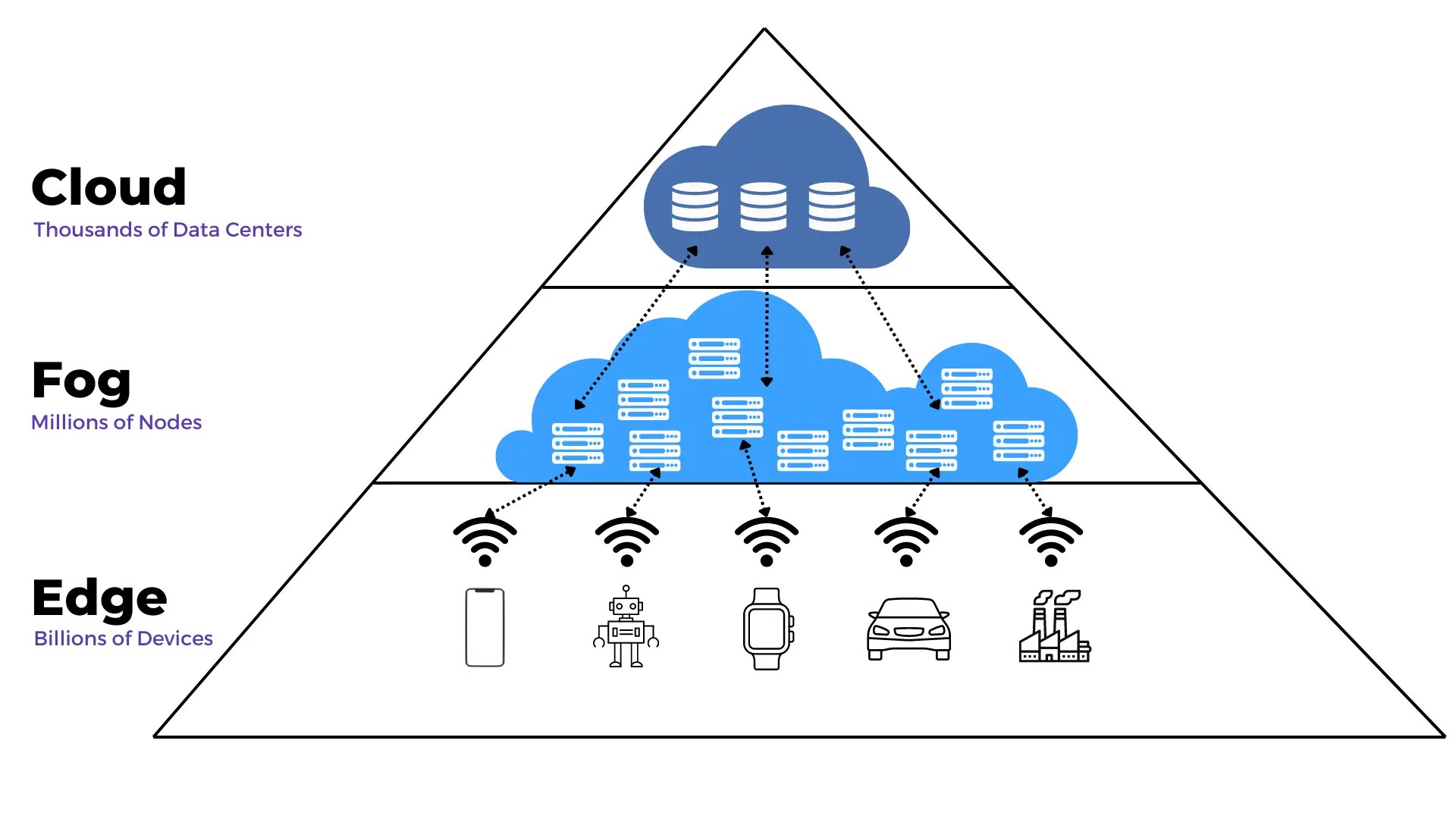
The definitions below explain how edge and fog process data, what each adds to the system, and why their hardware overlaps.
What is edge computing?
Edge computing processes data at or near the devices that generate it. The work runs on the device itself or a nearby gateway or server.
Local processing shortens the network path for decisions that would otherwise require a remote server. An edge application can filter readings or analyze images before sending selected results to the cloud. This reduces upstream traffic when the application doesn’t need to transmit every raw input. Use the application’s retention rules to decide which raw data to keep.
An edge server with enough compute and memory can run AI inference, which applies a trained machine learning model to new data. Smaller devices may only apply a simple rule. Check the task’s resource needs against the hardware and the site’s power and cooling limits.
What is fog computing?
Fog computing is a distributed model that shares compute and storage across nodes near connected devices. This gives local applications access to resources beyond a single device.
One common setup places a shared fog layer between devices and the cloud. This layer combines data from several devices and processes it locally before sending selected results upstream. Devices use the shared layer for tasks that exceed their own compute or storage.
Fog nodes can be physical machines or virtual instances, working alone or in groups. A fog computing architecture doesn’t require a cloud layer. However, each application still needs local access to the data and services it uses.
In IoT applications, a local server combines readings from several machines, then sends a summary to the cloud. Other fog computing examples include gateways that share processing work across a site.
Can edge and fog computing use the same hardware?
The same industrial computer can run a task for a nearby device and host a shared application for several devices. Its role depends on the workload and data path.
Check the software and capacity required for each job. If one server hosts both, confirm that the shared application can’t consume the resources reserved for time-sensitive local work.
Fog computing vs edge computing: Key differences
The table shows where edge and fog process data and how each uses local resources. It also compares response time and the work needed to manage each setup.
| Criterion | Edge computing | Fog computing |
| Main purpose | Process data close to its source | Share distributed resources near connected devices |
| Possible location | On devices, gateways, or nearby servers | On gateways, servers, or cooperating local nodes |
| Data scope | One device or several nearby devices | Often shared across devices or node groups |
| Data filtering | Can filter before sending data elsewhere | Can filter and combine inputs across nodes |
| Response time | Depends on hardware, load, and data path | Depends on hardware, load, and node connections |
| Management work | Maintain each device and its local applications | Also maintain shared services and node coordination |
When comparing edge computing vs fog computing, focus on what each node does. Speed depends on the hardware, load, and network path. To work offline, an application also needs access to all the services it uses.
How cloud computing works with edge and fog
Cloud computing provides pooled resources that users can provision on demand. This also includes private clouds, so cloud does not always mean a public service reached through the internet.
Cloud resources suit work that benefits from a wider view of data or access to more compute. Cross-site reporting and model-training jobs that exceed local capacity are some common examples. To support these tasks, local applications send selected records to the cloud while keeping time-sensitive decisions close to where the data is generated.
An edge application can connect directly to cloud services when it has no need for a shared local service. Route work through a fog node when the workload needs what that node provides. The broader edge computing vs cloud computing decision also depends on where you need pooled capacity and how your team will operate it.
When to use edge and fog computing
Choose where a workload runs based on the data and computing capacity it needs. Some tasks fit on a device or nearby server. Others benefit from shared processing across nodes, with extra cost and maintenance to account for.
When to use edge computing for local decisions
A task that uses one device’s data has less reason to depend on a shared server. Start by running the task locally when the device has enough capacity to meet the response deadline.
Measure the whole path from input to action under peak load. Network travel is only part of that time. The application also waits for resources and processes its inputs before it returns a result.
Compare slow responses as well as the average. A system that usually responds quickly can still miss the deadline that matters to the process. Define the acceptable delay for the task before choosing where it will run.
Keep the required data local if the task must continue through a network outage. Moving the code on-site leaves a hidden dependency when each decision still needs a remote lookup.
When to use fog computing for shared processing
A shared node becomes useful when a decision needs fresh inputs from several devices. It gives the application a place to combine those inputs and apply a common rule.
Both edge and fog applications can reduce upstream traffic. The reason to add a shared layer is the work it performs across devices. Sending data through another server without using its services adds a dependency with little benefit.
Shared capacity also makes sense when fitting a larger processor into every device is impractical. Check whether the local network carries all the required inputs at peak load. If tasks arrive faster than the server can process them, the queue grows and delays results.
Test that limit with the expected mix of tasks. A server that handles a single stream well may slow down when several devices need it at once.
Edge and fog computing costs and maintenance
Rule out designs that don’t meet the task’s response and recovery requirements before comparing their costs.
Compare costs across the deployment’s expected life. Local filtering may reduce cloud usage charges, while on-site hardware adds installation and upkeep. Shared storage and network equipment also need support.
Assign an owner to each part of the system, including the operating system and applications. Define who maintains the connections between devices. Assign DevOps tasks such as software updates, and name who restores the last working version if an update fails.
Include device replacement and site visits in the estimate. A design with fewer servers can still cost more to support if each site needs specialist repairs. Remote access helps only while the failed site remains reachable.
Edge, fog, and cloud computing example: Factory inspection
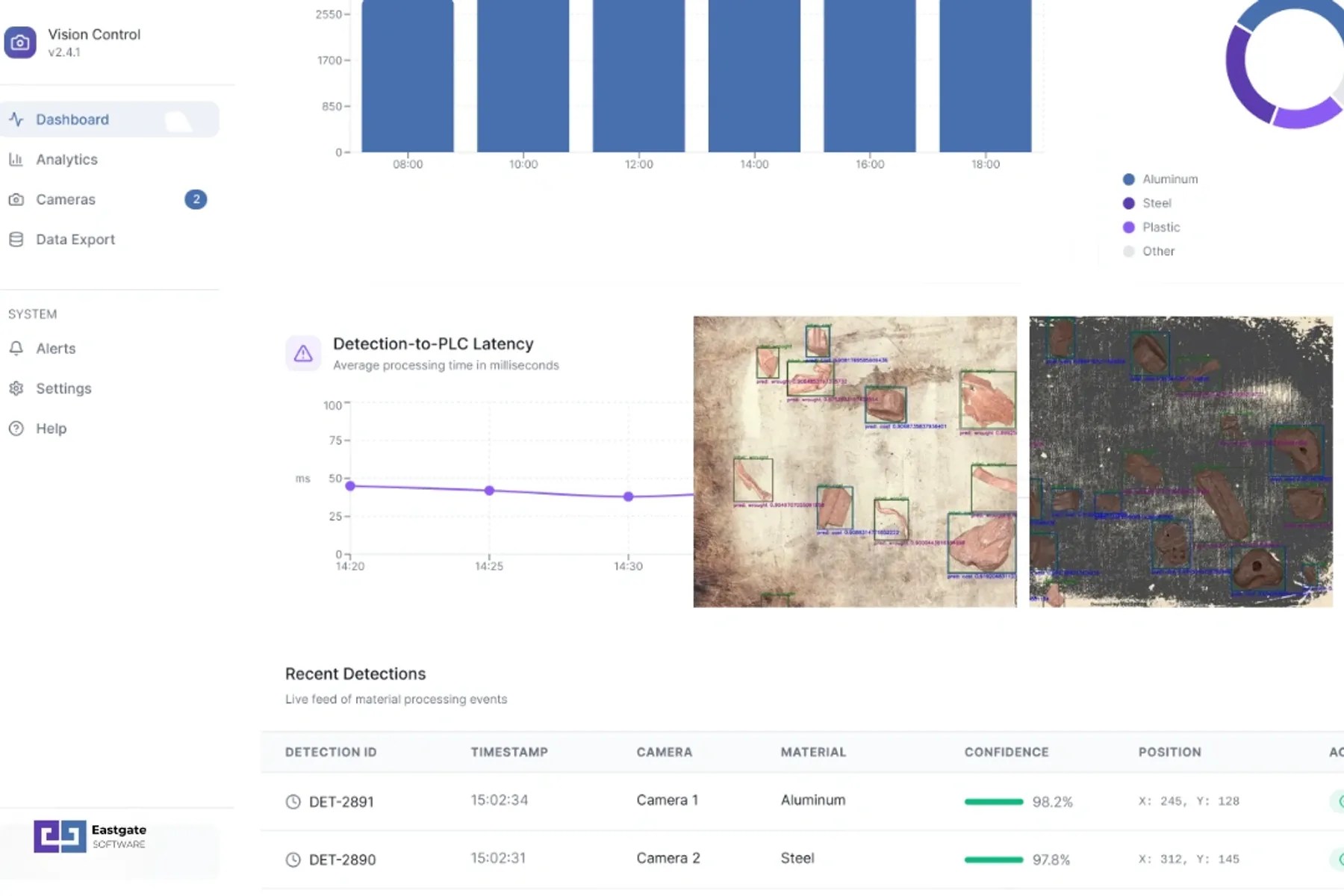
A factory inspection system shows how local decisions and shared analysis serve different needs. In our AI-powered industrial quality control project, we built a vision system for a US manufacturer. It runs on edge GPUs and detects materials on a moving conveyor belt.
The system identifies each material’s position and sends detection results to the existing programmable logic controller (PLC). The PLC then triggers the reject mechanism at the right moment. We integrated the vision system with that mechanism without replacing the existing control hardware.
The published case documents edge processing and PLC integration. The shared fog node and cloud workloads are proposed extensions to a wider factory design.
| Workload | Location | Evidence status | Reason for placement |
| Detect materials and send results to the PLC | Edge GPU linked to the existing PLC | Documented in the Eastgate case study | Keep detection close to the conveyor |
| Compare results across several inspection stations | Shared local fog node | Proposed extension | Combine fresh results from several stations |
| Analyze factory history and train models | Cloud resources | Proposed extension | Pool data and compute across sites |
In production, the system achieved 98–99% detection accuracy, exceeding the manufacturer’s 95% requirement. It sustained more than 14 frames per second across both camera feeds and sent detection results to the PLC in under 100 milliseconds. The system also runs around the clock without operator intervention.
These results show how edge processing supported fast inspection decisions while working with the factory’s existing controls. The practical lesson is to place time-sensitive work where it can meet the production deadline, then assess whether shared fog or cloud resources would help with broader analysis.
Edge and fog computing: Reliability and security
Moving processing on-site does not remove dependencies on other services or hardware. Test what happens when each dependency fails, then check how the system restores data and controls access to its nodes.
Test edge applications without a cloud connection
Run the local workload with its cloud connection disabled. Check whether it can start and authenticate, then confirm that it can access its configuration. A process that survives a lost connection may fail if it must restart while offline.
After an initial sync with the cloud service, the runtime uses cached data and stores messages to support offline work. Available disk space and message retention settings limit what it preserves for later delivery.
Treat that runtime behavior as a starting point for testing your own application. Set the offline period from the site’s requirements and check that required functions work for the whole period.
Test fog node failures and recovery
Test the loss of the local server separately from a cloud outage. Devices can lose a shared service while the internet connection remains healthy.
Check whether each affected task runs independently or pauses. If a second node takes over, measure how long it takes to become ready and confirm that it has the state the task needs.
Assign recovery work to someone who can reach the site within the required recovery time. Check how that person diagnoses the fault when remote access is unavailable.
Test backup power and local data recovery
Test power loss in a controlled environment that represents the proposed system. Check the devices and the network equipment they rely on. For example, a powered server can’t receive sensor data through a switch that has lost power.
Decide which equipment needs backup power and how long it must operate. Then test restart behavior when power returns. Local storage can hold records through a network outage, but damage to that storage can still destroy the only copy.
Restore the application and required records from backup onto replacement hardware. Measure the time needed and check what data is missing. A backup that can’t be restored within the site’s requirements does not meet the recovery need.
Check data synchronization after reconnection
After the connection returns, inspect the stored messages before your application replays them. The application needs to distinguish fresh readings from an old backlog.
Give telemetry and control commands separate replay rules. A delayed reading may still help historical analysis, while an old command are no longer valid. Check how each downstream service handles duplicate records.
Also confirm that clearing the backlog leaves enough capacity for new traffic. A healthy connection is still capable of carrying a queue of delayed work.
Secure edge devices and fog nodes
Keeping selected data local limits what leaves the site. For IoT security, you need to protect the devices and network at each site.
The AWS IoT Greengrass security guidance assigns customers responsibility for their devices, local networks, and private keys. Proximity alone does not establish security or compliance.
Control who accesses each node and how you update its software. Protect local records and credentials, then check what happens to them when you replace a device. A shared server receives data from several sources, so treat it as a distinct security boundary.
Our mission-critical systems teams build embedded software and IoT systems. We test device behavior and system performance to check how the parts work together.
In conclusion
Fog and edge computing support local data processing, but with different roles. Edge keeps work close to its source, while fog provides shared resources and coordination across nearby nodes. They can work together, and cloud services add capacity for wider analysis and long-term storage when the application needs it.
Start with the data each task needs and the time it has to respond. Keep independent decisions near their inputs, and add a shared layer when the task needs data or resources from other devices. Then test one production workload through network and node failures before expanding across the site.