Kanban and Scrum may look similar on paper, but they handle stakeholder checkpoints differently. Most teams now use hybrid or homegrown Agile models, according to Digital.ai’s 18th State of Agile Report, which found that 74% do so. For distributed teams, the key difference is that Scrum provides a built-in opportunity for stakeholder feedback through the Sprint Review, while Kanban leaves teams to define their own review cadence. Neither approach is inherently better. The important question is who needs to see progress, and how often.
That question becomes harder when delivery spans multiple vendors, time zones, or compliance-heavy release cycles, since neither framework is designed specifically around those conditions.
What is Kanban?
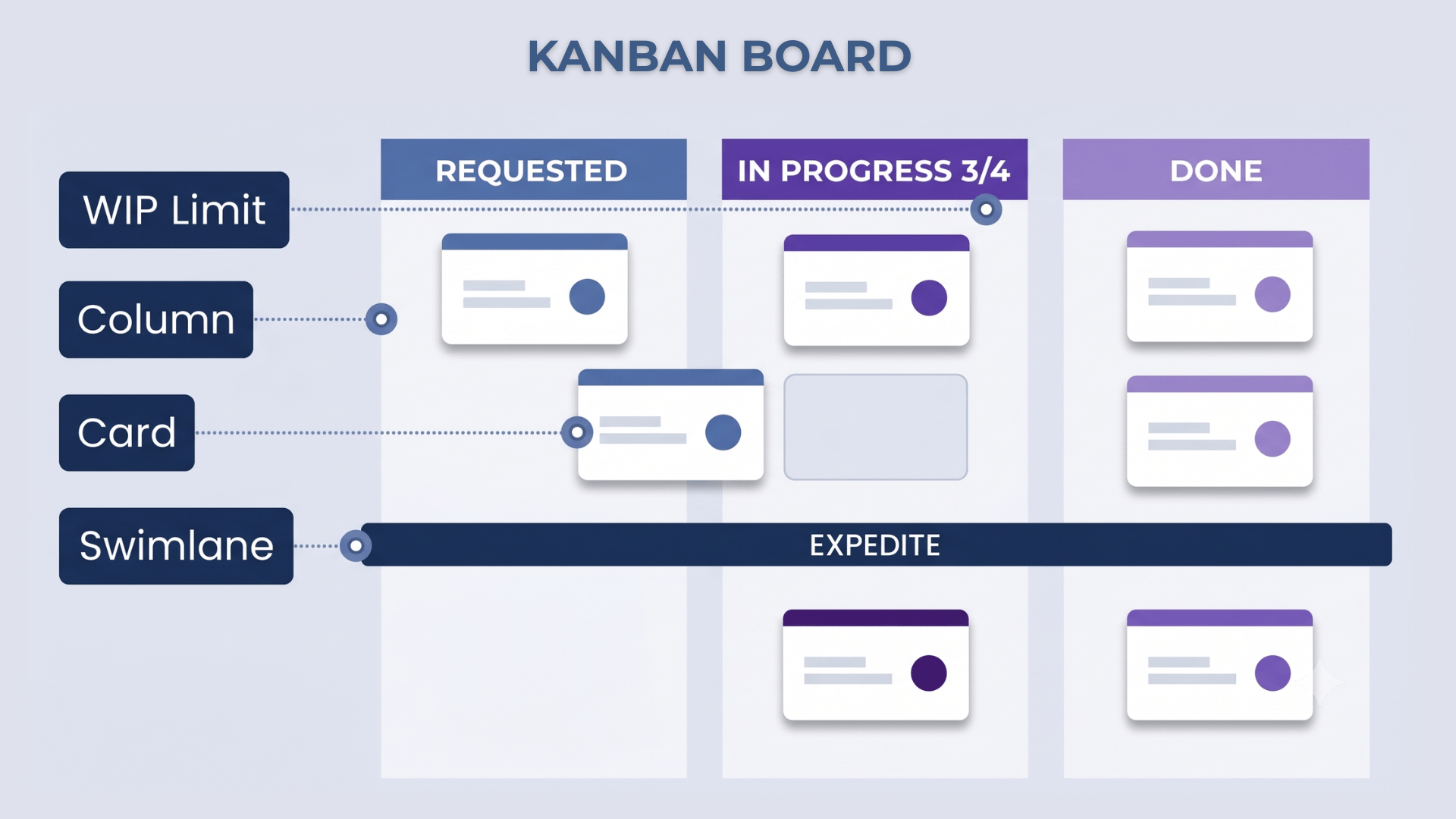
Kanban is a continuous-flow method for managing work, where tasks move through a visual workflow without fixed iterations.
In a Kanban system, teams visualize tasks on a Kanban board and move them through clearly defined stages, such as Backlog, In Progress, Review, and Done. Teams also set limits on work in progress (WIP) to prevent too many tasks from being handled at the same time. This makes the workflow easier to see, manage, and continuously improve.
Teams can prioritize and reprioritize tasks as requirements change, while keeping work moving steadily through the process. Kanban is commonly used in software development, manufacturing, and logistics, and other environments where teams need greater visibility, flexibility, and consistent delivery.
Kanban originated on Toyota’s factory floor in the 1940s. The word means “signboard” in Japanese, and the method used physical cards to signal inventory and work-in-progress across a production line. It’s now one of the two dominant approaches to organizing Agile delivery, alongside Scrum, and the two are often layered together rather than treated as strictly separate choices.
Kanban prescribes no roles, so you can layer it onto any team structure or method you use. For example, a team can schedule a weekly Scrum meeting to discuss which tasks to add to the Kanban board.
The key Kanban metrics to track are:
- Cycle Time: Measures how long it takes to complete a single work item from start to finish.
- Lead Time: Measures how long a request waits before the team starts working on it.
- Cumulative Flow Diagram (CFD): A visual chart that shows how work moves through each stage of the workflow over time. It helps teams identify bottlenecks and understand whether work is flowing smoothly.
What is Scrum?
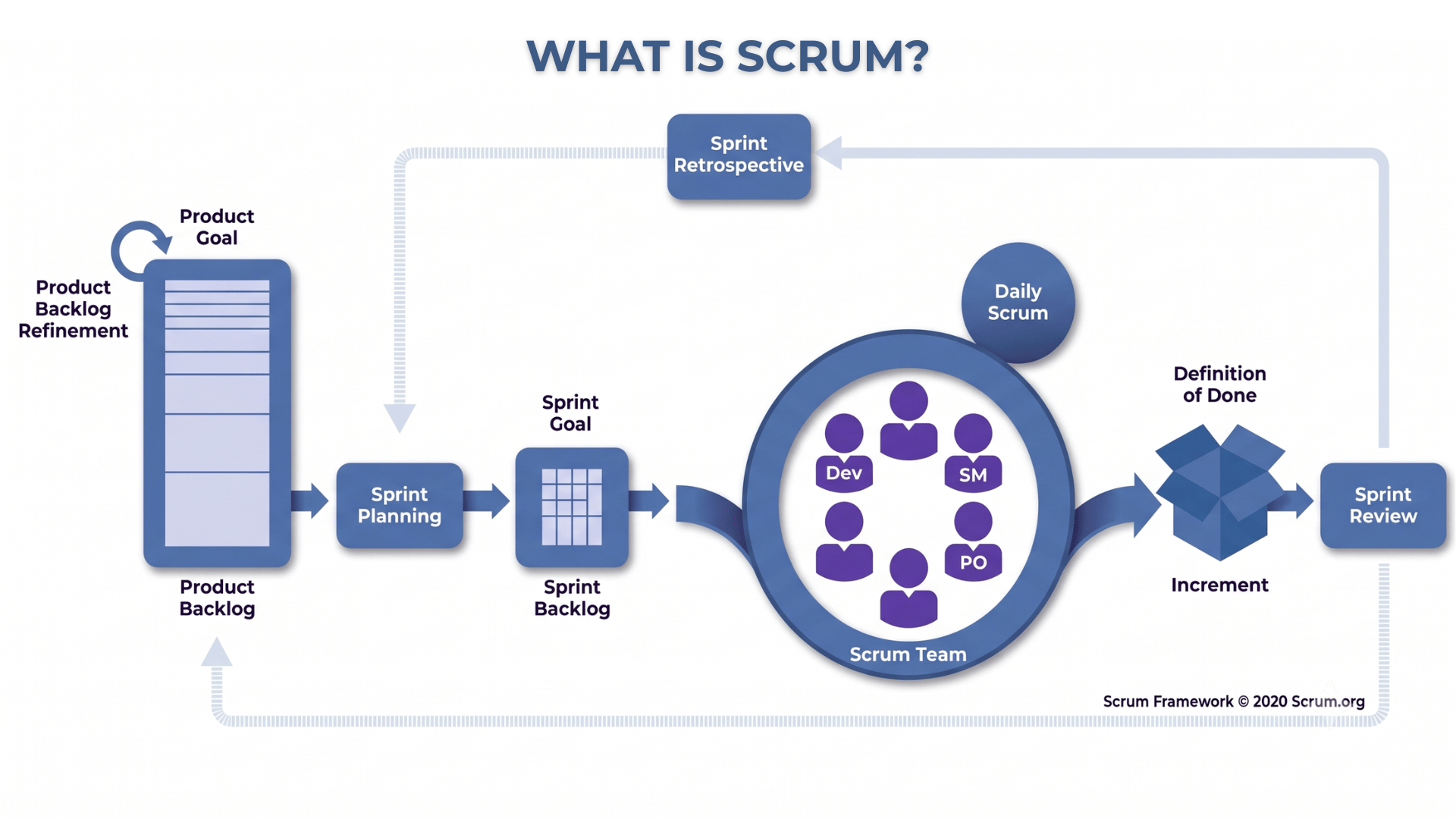
Scrum is a time-boxed framework built around fixed-length sprints, usually one to four weeks, with three defined roles and five recurring events.
Scrum was formalized by Ken Schwaber and Jeff Sutherland in the early 1990s, drawing on ideas from Hirotaka Takeuchi and Ikujiro Nonaka’s earlier writing on flexible, team-driven product development.
Scrum has three defined roles with distinct jobs:
- Product Owner. Owns the backlog and decides what gets built and in what order.
- Scrum Master. Protects the team’s process and removes obstacles.
- Development Team. Builds the work and is expected to be cross-functional enough to deliver a usable increment on its own.
Scrum runs on 5 events:
- Sprint Planning starts the sprint and sets the work to be completed.
- Daily Scrum takes place throughout the sprint to align the team and track progress. It can be daily, weekly, or monthly.
- Sprint Review brings the sprint to a close by reviewing the work completed.
- Sprint Retrospective follows the review and focuses on what the team can improve for the next sprint.
- The Sprint itself provides the fixed timebox in which the team delivers the planned work.
Of those five, the sprint review is the one that guarantees a stakeholder sees the work. It’s built into the framework’s definition, not something a team has to remember to schedule separately. That single structural fact is what separates the two frameworks most sharply once a stakeholder enters the picture.
Core Scrum metrics include:
- Velocity: The number of story points completed per sprint, used to understand how much work a team typically delivers.
- Burndown: A chart that tracks remaining work against the time left in the sprint.
For example, a typical two-week Scrum sprint follows a clear workflow:
- Sprint Planning: The team selects work from the product backlog and sets a specific sprint goal.
- Daily Scrum: The team meets each day briefly to share progress, identify blockers, and stay aligned.
- Sprint Review: At the end of the sprint, the team demonstrates the completed work to stakeholders and gathers feedback.
- Sprint Retrospective: The team reflects on how the sprint went, identifies what worked or did not, and agrees on improvements for the next sprint.
Scrum limits changes once a sprint starts. This is by design, as it allows the Product Owner to assure stakeholders that the sprint scope will remain stable. That stability becomes especially important when an IT outsourcing partner is involved.
Kanban vs. Scrum: Keeping Stakeholders in the Loop
Before choosing between Kanban and Scrum, it helps to understand how each framework handles workflow, planning, change, and stakeholder communication.
| Dimension | Kanban | Scrum |
| Cadence | Continuous flow, no fixed iterations | Fixed-length sprints, typically 1 to 4 weeks |
| Roles | No prescribed roles | Product Owner, Scrum Master, Development Team |
| Core artifact | Kanban board with WIP limits | Product backlog and sprint backlog |
| Change tolerance | Priorities can change at any time | Sprint scope is generally protected once the sprint starts |
| Core metrics | Cycle time, lead time, cumulative flow | Velocity, burndown |
| Planning unit | Individual work item | Sprint goal and sprint backlog |
| Built-in stakeholder checkpoint | No | Yes, through the Sprint Review |
The main difference comes down to how each framework structures work. Scrum is time-boxed and role-based, with teams planning around a specific sprint goal. Kanban uses continuous flow and focuses on moving individual work items through the workflow.
The two frameworks also define “finished” differently. In Scrum, the team uses a Definition of Done, a shared standard for when a work item is considered complete. Kanban does not prescribe an equivalent term, but teams can define an explicit completion or exit policy for the final stage of their board. In both cases, agreeing on what “done” means helps prevent confusion about whether work is actually complete or moved to the next stage.
Keeping Stakeholders in the Loop
For teams weighing in-house vs. outsourcing software development, the choice between Kanban and Scrum also affects how progress is communicated with clients, external partners, or other stakeholders.
Scrum has a built-in Sprint Review, which provides a formal checkpoint at the end of each sprint. The team can demonstrate completed work, collect feedback, and confirm that progress matches expectations. This structure can work well when an external partner needs regular milestones or sign-off points.
Kanban does not include an equivalent stakeholder event. Its continuous-flow model provides ongoing visibility into work through the Kanban board, dashboards, and workflow metrics. However, teams may still need to add deliberate communication points, such as regular client reviews or progress updates, when stakeholders need more than visibility into the board.
This distinction matters when choosing a framework for an external engagement. A fixed-price project with defined milestones may benefit from Scrum’s structured planning and review cycle.
A time-and-materials engagement with changing priorities may fit Kanban better because the team can continuously reprioritize work without waiting for the next sprint.
The key is to choose the framework based on how the engagement needs to operate. If stakeholders need formal checkpoints, add them. If they need continuous visibility, make the workflow and progress easy to access.
Coordinate Kanban or Scrum across a distributed delivery team
Time zone spread and multi-vendor coordination change how either framework gets run, even though neither framework’s definition addresses distributed teams directly.
Scrum and asynchronous coordination: Scrum assumes some degree of overlapping hours. That said, most teams apply Scrum in an asynchronous practice, such as a written standup in a shared channel, a short recorded video update, or a narrow rotating overlap window. This frequent sync often surfaces blockers before they affect the project.
Kanban and continuous flow: Kanban removes one source of distributed-team friction because there is no sprint boundary to synchronize across time zones. Work moves when it is ready, but that also makes stakeholder checkpoints less obvious because there is no natural pause for the team to stop and report progress. Once multiple pods or vendors are involved, client reporting works best when everyone reports on the same schedule.
Handoffs are another quiet source of friction in distributed delivery. A team that relies on live conversations to transfer context will lose information whenever working hours do not overlap, so written handoff notes tend to hold up better than verbal standups. Use a written handoff to the specific card or ticket rather than a general status update. The extra few minutes per handoff can prevent a much more expensive problem later: a stakeholder update based on incomplete or assumed context.
Kanban vs. Scrum for compliance-heavy or mission-critical systems
Scrum’s structure and Kanban’s flexibility carry more weight in mission-critical projects than they do for a typical internal product team.
Scrum’s fixed sprint boundaries naturally produce a documented, repeatable release rhythm. That’s useful when a release needs evidence of review at predictable intervals, such as a sign-off ahead of every deployment window or a fixed reporting cycle a regulator expects to see.
Kanban can still support compliance work, but you have to build the audit trail deliberately. That means explicit policy gates on specific board columns, rather than inheriting the trail automatically from the cadence the way Scrum’s sprint boundaries provide it. For example, a mandatory security review column might sit right before anything reaches “Ready to Deploy.”
The real difference is how much you need to customize the structure versus how much is already built into the method. A team running Kanban in a regulated environment usually ends up recreating something that looks a lot like Scrum’s checkpoint discipline. It just gets built column by column instead of sprint by sprint.
Release cadence and audit cadence aren’t automatically the same thing, even under Scrum. A two-week sprint boundary doesn’t guarantee a two-week release. A team can easily end up demoing work in a sprint review that then sits for weeks. It’s waiting on a separate change advisory process before it ships. Map the framework’s own checkpoint against the compliance process’s checkpoint explicitly, whichever framework you run. Don’t assume a sprint review or a Kanban policy gate is the same thing as passing an actual regulatory or security review.
We build to this standard in our mission-critical systems practice. The audit trail and the release checkpoint are two separate requirements, built into the workflow rather than left to chance. In transportation and tolling work, a missed checkpoint isn’t a gap in the process. It’s a compliance failure.
When to use Kanban
Your work arrives unpredictably
Support, maintenance, or unexpected work rarely fits neatly into a two-week box. Kanban’s continuous intake and WIP limits handle a steady stream of unplanned requests better than sprint planning does. There’s no sprint commitment to break every time something urgent lands.
Your team is small or single-discipline
Below a certain team size, full Scrum ceremony overhead stops paying for itself. If your team is small enough to share two pizzas, that coordination is probably already happening on its own, through everyday conversation- the same coordination Scrum’s roles exist to manage.
Priorities and continuous updates happen regularly
Kanban is the natural fit if your stakeholders care more about continuous visibility than a scheduled sign-off. Just make sure the visibility mechanism, a shared dashboard or a regular async update, exists and isn’t assumed.
You’re managing a shared queue across several requesters
A platform, DevOps, or shared-services team fields requests from multiple internal or external stakeholders. It rarely has the luxury of committing to a fixed sprint scope, since the next urgent request is only ever a day away. Kanban’s pull model fits that reality more closely than a sprint commitment does: the team pulls the next item once capacity frees up, rather than committing to a batch upfront.
When to use Scrum
You have a defined goal and a real deadline
Product development with clear scope and a delivery date benefits from Scrum’s planning cadence. The sprint commitment also acts as a forcing function, keeping a team honest about what’s realistic.
A stakeholder or client needs a recurring checkpoint
Scrum’s sprint review delivers a guaranteed, scheduled moment to see and sign off on progress, structurally, without a separate reporting process bolted on after the fact.
Your team is ready for defined roles
Scrum requires clear roles and decision-making authority, not just the right titles. The Product Owner should have final authority over prioritization instead of relying on leadership or a committee for every decision. The Scrum Master should enable the Scrum process rather than simply act as a project manager with a different title. Otherwise, teams may keep the Scrum ceremonies without actually following the discipline behind them.
You’re building something new
Greenfield product work benefits from the forced reflection a sprint retrospective builds in. A new product’s process is usually wrong in a few small ways early on. Scrum’s cadence gives the team a regular, low-stakes moment to catch that, instead of letting it compound silently for months.
Scrumban: Combine both without losing the checkpoint
Scrumban works well for teams that need Kanban’s continuous flow but still want the regular checkpoints built into Scrum.
The team keeps the sprint review as a fixed, scheduled event. However, work continues to flow through a Kanban-style board. Instead of committing to a sprint backlog, the team pulls tasks from a prioritized, continuously refined backlog and uses work-in-progress limits to manage capacity.
For distributed or outsourced teams, Scrumban is often the natural choice once they recognize the need for both continuous delivery and regular alignment.
In practice, adopting Scrumban usually means simplifying sprint planning rather than removing it. Sprint boundaries remain, but mainly to trigger reviews and retrospectives. This shift is often less disruptive than it appears. It gives Scrum teams more flexibility without abandoning their existing rhythm. It also gives Kanban teams a regular checkpoint without requiring the full set of Scrum ceremonies.
Will AI-assisted delivery change this calculus?
This is still a forward-looking question, not an established finding. Neither Scrum nor Kanban was designed around AI-assisted software development, and there is not yet enough evidence to say which framework benefits more from AI.
What we can see today is how AI is already changing parts of each workflow:
- Scrum: AI can post daily prompts in Teams or Slack and collect async updates from distributed teams. This can support the Daily Scrum without requiring everyone to find the same meeting time.
- Kanban: AI can draft task descriptions and acceptance criteria before work begins, then check completed work against those criteria before a card moves to Done.
The bigger question is what happens when AI-assisted coding speeds up software delivery. If coding becomes faster, the bottleneck may shift toward review, testing, and integration. That could make Kanban’s continuous flow more useful, as teams can keep work moving without waiting for the next sprint. On the other hand, Scrum’s fixed checkpoints could become more valuable as deliberate moments for stakeholders to review progress when delivery is moving faster than before.
There is no clear answer yet. AI and agile development are still evolving, so AI should not be the deciding factor when choosing between Kanban and Scrum today.
One thing is already clear: faster delivery increases the need for stakeholder visibility. When work moves faster, teams need deliberate checkpoints or transparent workflows to help stakeholders keep up. Speeding up delivery does not remove the need for communication. It can make the gap between delivery speed and stakeholder visibility even wider if teams do not address it, the same discipline any digital transformation strategy demands: prove the change works before scaling it everywhere.
Final thoughts
Kanban and Scrum are both well documented, and either one can be learned from its own guide in an afternoon. The harder question is what your delivery needs to prove, to whom, and how often, then picking, or combining, the framework that delivers that.
Before comparing ceremonies, roles, or boards, answer one question first: who needs a checkpoint, and how often? Everything else in the Kanban vs. Scrum decision follows from that answer, not the other way around.
That holds whether you’re running one office or coordinating four time zones and two vendors, but it stops being optional the moment a stakeholder can’t just walk over and ask how things are going. Get the checkpoint right, and the framework underneath it becomes a much smaller decision than it looks like at first.